Open Channels FM: Why Fast AI Inference Is a Game Changer for Developers

In tech, speed can make all the difference. One topic that doesn’t get enough attention is just how much faster AI inference is changing the way developers work. Training AI models still grabs the headlines with all the talk about big clusters and huge data sets, but the real impact for most developers happens when […] 

Dennis Snell: Radical explorations in agentic development

In mid-April 2026 my employer started a project called “Radical Speed Month” to step away from our existing structures and processes, make space for people to dive more deeply into AI tooling, and try to build new or sleeping ideas. My participation in this experiment ran until late September and I stacked up a lot of explorations without having written about them or about the process. In this post I’d like to highlight some of the results of this time and share some learnings.

Selected lessons

  • Massive agentic deployment demands heavy storage and generic compute capacity — inference is not the only bottleneck. This is necessary to support massively parallel checkouts of code, benchmarking, analysis of other software and data, running hierarchies of thousands of test workers and headless browsers, generating and analyzing image and video artifacts, creating indexes, and more.
  • Instructing an agent to “find the five hidden defects” is more effective at finding real issues than asking if there are any hidden defects. They may return false claims, but they try to answer the questions they are prompted — it’s not that different than the comparison between asking someone what in their day brought them a smile, or what was difficult for them, rather than asking “how was your day?”
  • Agents with web searching capabilities are powerful knowledge-retrieval and aggregation tools. Reports they generate to aid in developing code can be more effective than asking the agents to generate the code directly.
  • Models today are incredibly powerful, but guiding human insight is also powerful. Autonomous agentic activity demonstrated a tendency to produce more evidence of accomplished work than actual accomplished work. In a strange way this might reflect the training dataset: corporations must also guard against the dangers of overly-burdensome paperwork.

Projects

All of the projects here were almost entirely built by AI agents, but with my guidance and supervision. Therefore, credit for each of them does not rest entirely with me. However, for the sake of brevity I will omit mentioning in each one that AI tooling was the actual producer.

Each project below is assigned a truly unscientific evaluation:

  • ✅ The project succeeded with clear value.
  • 🤷‍♂️ The project completed its goals, but the value is unclear.
  • ⏳ The hard work has completed, but I need to close the loop and deploy it.
  • 🔄 The idea is sound but not ready; it needs more development.
  • ❌ The project failed to bear fruit for any reason.

My personal favorites:

Tools

Because I expected a short availability for the enhanced AI access, I prioritized building, early on, tools whose value would outlast the project. Generally I prefer working in offline or local environments, so I built archivers for several services which are only available when connected to the Internet.

While MCP servers were very popular at this time, I have always been unhappy with the load centralization and amplification they create. The same is true for any online resource against which agents perform searches. My intuition is that it’s more considerate to those services to make one batched update, to download all new data since the last sync, than it is to make repeated queries which might overwhelm their servers and fetch the same resources over and over.

Being offline and local, the archivers are extremely fast and operate in the terminal where I prefer to interact.

✅ GitHub archive

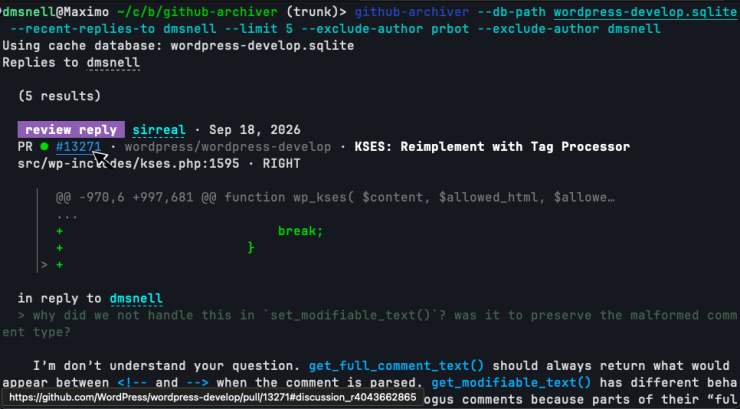
Finding GitHub’s search functionality lacking, and wishing for a chronological stream of my activity, I built github-archiver so I could have the tools and performance I wanted. This initially supported searching through PRs, issues, and comments, as well as rendering my own activity in a reverse-chronological view. I eventually added two additional views for replies: people I replied to, and people who had replied to me. This gives me great awareness of my recent conversations and has helped me to avoid losing conversations. Sometimes I struggle to find a PR that I meant to follow-up on, but it disappears from my GitHub notifications and I can’t remember the exact wording that will turn it up in a search result. I even tend to forget in which code repository it was left, so my tool aggregates activity across all archived repositories.

The basic design is a compressed HTTP cache of the GitHub API. When fetching or updating, it respects rate limits and leans on HTTP headers to avoid wasted transfers. After some work with banking APIs several years ago, I found that storing raw HTTP responses proved more flexible than parsing into a custom internal data type, as it lets me rewrite logic in the app later without having to re-download the entire archive. This came in handy several times as I expanded the search index and added more functionality.

The tool renders GitHub content as richly-formatted and highlighted text in a console unless running outside of an interactive TTY. It renders Markdown and HTML content into this rich text format and lays out meta elements in a meaningful way. Its speed, zero-network dependence, and minimized output make it a good fit for agents that would otherwise be hammering GitHub’s API, waiting, and wasting tokens on irrelevant content.

github-archiver renders PRs, Issues, comments, and line-level comments into the terminal with parsed markup, syntax highlighting, code snippets, and links created via ANSI terminal codes. It provides an alternative to the slower browser-based interface.

✅ Trac archive

Just like the github-archiver, I built a trac-archive for WordPress’ Trac system. It is feature-similar to the GitHub archiver, but provides an additional perk: because bots relay messages from GitHub back into Trac, issues often have two markup formats in use simultaneously. My trac-archive first parses its content according to Trac’s own system, but then it additionally parses Markdown where it finds it. It shares much of the rendering logic with the github-archiver and provides a clearer experience than the web view due to the additional parsing, syntax highlighting, and ability to exclude bot traffic from the results.

Like the github-archiver, the trac-archive renders tickets into the terminal with parsed markup, syntax highlighting, code snippets, and links created via ANSI terminal codes. It provides an alternative to the slower browser-based interface and in many ways a more usable one due to the way Trac aggregates content from GitHub.

✅ Review the evolution of a series of commits over time

git-sequence-patch was used to help me understand the full scope of the WordPress collaborative editor project. Since many large features or projects span many commits and possibly even months or years of work, this tool reads a number of git commit SHAs and will build a fictitious patch that more or less represents how the entire project would be proposed were it to be proposed against the latest branch head. Another way to look at this is to generate one massive revert commit for the original feature and all descendant changes to it since its inception.

This is a project I had been wanting to build for a long time; for each of the given commits, it tracks which lines were changed by the commits, and then steps forward through the branch history, noting when other commits also modify or remove those lines. Once it completes at the branch head, it prepares a patch to replace all of those lines with the code that was there before the original patch, and reverse the patch. This means that it doesn’t produce a patch that would actually merge, but it produces a patch that’s useful for understanding the full scope of how a change evolves over time.

It’s line-oriented and so would miss some obvious scope. For example, if tracing the sequence for a new function, it will miss a later change which calls into that function. This would actually be possible to add to the tool as an enhancement, but it wasn’t necessary for my purposes at the time and I think it would remain ideally an option rather than a default behavior.

I spend a lot of time trying to quickly understand entire systems that I didn’t write or have any experience with, and this tool is a delight for answering the question: “how has this change evolved through time?”

✅ Analyze real-world HTML from Common Crawl

To better test the HTML API against real HTML documents, I built cc-analyzer, which feeds data from the Common Crawl index into a user-supplied PHP script. This operates in two modes: streaming and batched. In streaming mode it continuously sends HTML documents from the archive into the analysis script. In batched mode, it saves documents from the archive into a subdirectory and then may be invoked again to re-run those documents through specific analysis scripts.

This project has greatly benefited the testing and verification of the HTML API, and informed decisions about what actual HTML syntax patterns exist on the web and what concerns are practical and which are esoteric. Throughout this grand experiment I have examined hundreds of thousands of HTML documents to test the HTML API code, to understand reported and actual text encodings of websites at large, to benchmark changes and optimizations for the HTML API, and to understand parsing needs of real HTML documents.

✅ Instantly search code from the WordPress ecosystem

Veloria.dev (formerly WPDirectory.net) provides fast code search across all of the plugins and themes listed on the WordPress directory. It was experiencing elevated outage rates and I decided at the start of September to recreate it locally as a single binary with a simple compressed offline archive. Previous efforts to slurp the directory left efficiency gains on the table and output around 120 GB of data on the filesystem. By taking advantage of available concurrency, streaming computation as resources are downloaded, pruning the stored files to those which were being indexed, and saving into a custom compressed binary object, my wp-code-search tool was able to archive the directory in five hours storing only 5 GB among three data files: a compressed archive of the source files, a search index, and a metadata archive.

This idea originally came from Dan Luu, who commented that “if we’re repeatedly searching for text on a computer, the obvious thing to do to speed that up isn’t to write a native code compiler for regex matching, it’s to create an index.” Code searches across the entire directory typically return within 10 ms, output syntax-highlighted snippets from the files in which they are found, and the tool can extract those files or entire plugins from the compressed archive. The index is sorted by active installs so the most-deployed results appear first.

When performing searches on the WordPress directory, the results print out with the name of the file the result was found in, how many active installs the plugin reports, and a syntax-highlighted snippet of the code with the search matching underlined.
Basic regex searches execute in milliseconds.

This tool has become an invaluable daily driver for me as I refactor Core WordPress internals and want to avoid needlessly breaking existing code.

Towards the end of September I had another long-shot idea: could the ideas making the text search so fast be mixed with structural queries so that I could perform data-flow and control-flow analysis on the code? Turns out that yes, with another 5 GB sidecar index, and a custom WordPress-specific query syntax this was not only possible, but practical with many complicated queries executing in anywhere from a few seconds to a few tens of seconds.

There’s a lot of power in this query syntax to identify complicated code structures and I still have to learn how to generate the kinds of queries I want to. I built the structural code search to aid in discovery of risky code patterns to harden as part of my work improving WordPress’ security stance.

🤷‍♂️ Text-mode access to the modern web

My zs tool performs web searches and downloads rendered HTML pages in the terminal. Fascinatingly enough, when I attempted to start this project I tried explaining very clearly that I wanted to adhere to the terms of use for all services, that I wanted to respect the remote servers providing the content, and that this was a user-agent acting on my behalf to perform queries in the terminal instead of a browser. Unfortunately, it seems like the instructions to follow the rules were misinterpreted as attempted bypasses and overly-refused.

Regardless, I was able to create this non-GUI browser and build up enough of the Web Platform to render the pages I wanted to view. When Captchas and other verification interstitials appear, they render inline into the terminal via terminal raster commands. I’m able to indicate which boxes contain the bus, or motorcycle, or a bridge, which Google seems really intent on learning, and continue with text flows and shell pipelines.

My motivation for building this was to perform web searches from the CLI, but once I had the mechanisms in place to interact with the search engines, I realized I could also use this to grab dynamically-rendered pages. For any given URL, a page loads, executes scripts, and renders until the JavaScript event queue empties or a timeout trips, and then the final DOM serializes into the HTML output.

This makes the tool more valuable than my typical curl flow, which too-often downloads an empty HTML page reminding me that I should be using JavaScript. Because it implemented so much of a browser’s internals, I added a feature to extract the visible text content of the rendered page, something which is surprisingly difficult to download without a full browser and CSS engine, and something which is really valuable when trying to pipe documentation pages into coding agents.

All in all it’s a bit buggy and I would like to start over based on what I learned along the way. It still works sometimes and it’s valuable to me when web pages return otherwise-empty mountains of script contents.

WordPress.com

⏳ Clarify wording in notification messages

WordPress.com sends notifications about comments, likes, follows, etc., and sometimes the wording is awkward or inconsistent. I generated a report classifying emotional content of the wording and suggested improvements to better inform the reader of what they could or needed to do. It was effective at joining snippets of strings that are concatenated together throughout the code and provided useful insights. It also provided good suggestions for updates that focused on removing anxiety and clarifying possible actions to take in response to the alerts (e.g. replace “Renewal Failed” with “Payment did not go through; update by May 18 to keep your plan active”). Unfortunately those updates are still on my backlog to deploy.

⏳ Migrate confused legacy data to simplify runtime code

There are old notification records in the database with conflated and truncated values, and these require complicated code when rendering them to make sense of the confused properties. I was hoping that it would be possible to have the AI examine these broken records and the generating code and provide clear guidance on how to update them. Among 3,000 old records in the database, it proposed seventeen cases for recovery and fixing. Unfortunately this also sits in my backlog to assess and apply.

✅ Fix translation issues and typos

Developers frequently concatenate separately-translated strings which lead to confusing translations. I ran an analysis for this kind of translation issue inside the notifications source code and also for typos and other mistakes. This produced a list of around fifty bug-fixes, including for a missing namespace specifier that was broken for more than a decade and which hadn’t been noticed in error logs, malformed HTML tags which had been hard-coded in string literals, plenty of concatenated translated strings, broken interpolation placeholders, missing calls to the translation function, and missing null checks. This was deployed in May to the production system.

WordPress, the open-source project

🔄 Generate automatic previews for dev-docs changes

WordPress Playground runs a copy of PHP and WordPress entirely in the browser via compilation into a WASM environment. It provides testable previews for WordPress and Gutenberg PRs. Missing has been a way to preview changes to the generated developer documentation, which is notoriously difficult to get running at all, let alone dynamically in a browser. I proposed a demonstrator in #29 that does just that through a GitHub Actions workflow on PRs. It has inspired follow-up, but due to the need to ensure a maintainable solution, is still pending deployment.

🔄 Harmonize the ignore ruleset across git and Subversion

The official WordPress source code lives in Subversion with a git mirror. The .gitignore and Subversion ignore rulesets are fundamentally distinct from each other, notably in that git ignore patterns apply recursively through a file tree. I attempted to use AI to harmonize the rulesets. Some adjustments were made, but the entire set still needs careful review.

✅ Visualize per-package activity within Gutenberg

To better understand per-package activity within the Gutenberg editor project, I produced a visualization showing commit activity.

✅ Provide deep insight into PHP script execution

Inspired by my childhood Gameshark, I built a PHP extension to improve my ability to debug and analyze PHP script runs. This started as a way to compare two runs of a given script, but expanded into a set of related but distinct modes.

Differential mode compares which functions were called and how many times across two different script runs; this could be useful for performance optimizations or comparing what runs for two different code paths and was built initially while working on page renders vs API call responses.

Trace value records every function or method call whose arguments contain a requested value. It tracks user space as well as builtin functions and was built to help identify code paths which send untransformed data where it shouldn’t reach. A follow transformations option tracks not only the given value, but also common escaped, encoded, serialized, quoted, slashed, and other variations of it. This is a clever security tool for finding out where and how unwanted data is passed around.

Invariant mode takes a PHP file with “hooks” that attach to functions and methods, either during entry into those contexts or when returning from them. They are supplied the values to the arguments, the $this value if a method, and the return value if a post hook. This enables a novel approach to applying software contracts on code with neither the production runtime overhead nor the noise from the contract-enforcement. This was loosely inspired by Clojure’s core.spec. Because the hooks file is user-space PHP code with access to global state, this provides mechanisms for enhanced testing and analysis code, and when registering a shutdown handler in PHP, can print reports at the end of script execution. Hooks may also raise exceptions to halt execution when any desired invariant is violated, such as when preg_match() receives a pattern that might be attempting to parse HTML.

Unused runtime coverage mode generates a report of all loaded identifiers which were never read or executed during a script execution. A sampling option can be used in production to assemble such a report, probabilistically, over time. This mode was designed to find effectively dead-code that might be lurking behind runtime conditions which can never actually run due to real data distributions. For example, a function which is only ever called before a given date, when the given date is several years in the past. Static analysis will miss this while a month of production sampling with no calls will provide evidence that it’s safe to remove the function, that no other strange or unexpected call-paths are still calling it.

Trace allocations mode traces heap allocations made by PHP during a script execution. It immediately surfaced unnecessary allocation in wp_is_numeric_array(), which was promptly eliminated in [#12100].

This extension has provided incredible insight into how WordPress and other PHP scripts run, and I’ve only scratched the surface of how I can take advantage of it.

🔄 Introduce dynamic security policies into PHP with eBPF to isolate plugin code and extensions

Like the php-gameshark extension, I built a modified php binary which coordinates with eBPF in the Linux kernel to apply dynamic security policies and create isolated security domains within executing PHP code. There is no logical separation between executing the Core WordPress code and the code from plugins running on a site. This is a security challenge because the two kinds of code warrant different trust, and a site operator may want to assign unique trust and capabilities to different plugins.

This extension provides a wp_runtime_security_apply_policies() function which registers sandboxing rules against files whose source code matches the provided glob. It allows disabling network access, shell execution, sending of emails, reading uploaded files, and writing uploaded files demonstrating a path towards securing WordPress sites from errant or malicious plugins, as well as an explicit opt-in capability model for plugins as they have need. It doesn’t just protect user-space PHP code either; thanks to the fact that policy enforcement occurs within eBPF, it can also apply the same policies against compiled PHP extensions running on the host, assuming that the extensions are not actively attempting to exploit the guards (the protection is aimed at security vulnerabilities within the commonly-deployed PHP extensions, not against potentially-malicious extensions).

I built this extension after a discussion with Lynn Griffith at WordCamp US in late August. It seems promising but is under-developed and needs production testing. As it relies on eBPF, it only supports Linux environments, ruling out Windows, BSD, and macOS-based hosts.

User-space PHP code can change the current policies by passing a descriptor object to the extension showing which file globs are to have which privileges.
Policy rules stack: code deeper in the call stack may further restrict the permissions, but cannot expand them.

✅ Benchmark HTML parsing optimizations against realistic data from the Internet

With the aid of cc-analyzer, I automated the benchmarking of numerous optimizations that we have explored over the years with the HTML API, mostly changes to the internal data structures and how attributes are represented during the parse. The AI tooling provided the run-scripts for cc-analyzer, invoked it, and gathered the results. It also collected PRs that I had proposed (using the github-archiver) since May 2023 so that I didn’t have to find them.

✅ Fuzz-test the HTML API

I fuzz-tested the HTML API, finding several unreported bugs, including easy-to-overlook defects in the code. Fuzzing in this way also prevented a number of defects with the rewrite of wp_kses(). This complements the existing spec-compliance tests against the html5lib test suite, practical tests against real HTML from the web, and a unit-test suite covering intentional behaviors.

❌ Scaffold fuzz-testing in Gutenberg

I attempted to build a generalizable fuzz-testing infrastructure for the Gutenberg editor. This was an extended autonomy agentic session that ultimately produced a good-looking dashboard with nothing but false-alarms. I tried to establish a framework in which other developers could easily add new generative categories and the system would run new fuzzers for them, compare outputs, and triage failures. AI parallelism made for impressive work, but in this early project I was unable to accomplish my goal and gave up on the idea.

✅ Port data sync libraries into PHP

As an experiment in goal-oriented design, ten distributed data structure libraries were ported into PHP userspace code to aid in building a demonstrator for the DE-RTC prototype [#12334, #79602]. With minor caveats, this built working copies of yjs, automerge, loro, diamond-types, diff-match-patch, json-patch, json-joy, sharedb-json0, prosemirror-collab, and collabs which passed their upstream test suites when they were converted to call the PHP code. Eight of the libraries were completed within a few days, but loro (the library I was primarily interested in) and json-joy held out the longest, taking weeks to complete. They appeared stagnant for the bulk of that time and rapidly finished passing the remaining tests in a burst at the end. While I had originally built a prototype collaborative editor with yjs (which is what the existing project team had chosen to use in JavaScript), once automerge completed I was able to swap out the synchronization primitive and later do that again with loro, adding the capability to make more semantically granular changes and merges. This work was almost entirely hands-off and ran in the background until it was completed; every ten minutes it updated an HTML dashboard showing status and operating notes.

✅ Fuzz-test the proposed collaborative editor for WordPress

From the end of April until October, I paired with Dan Luu to fuzz-test the collaborative editor proposal, and we uncovered an array of issues which ultimately led to changes in the timeline for the project, as a number of the defects were nontrivial to solve. Most of the fuzz infrastructure was built by Dan, while I attempted to coordinate the reproducible bug reports with the rest of the team and to propose fixes. The fuzzing machinery produced effectively no false positives due to the triage and reproduction steps built in. It also provided the visuals for theoretical bugs which are hard to diagnose manually with a keyboard and mouse, but which actually occur frequently in concurrent systems.

This was a high-reward project for the investment because, while AI was dominant in the early code generation, once the testing suite was established, it was able to continue to operate without much additional AI input, and it’s possible to run without any AI inputs.

It highlighted two aspects of fuzz-testing: the more robust the code being tested already is, the more valuable the fuzz-testing will be; and the more frequently a bug is likely to materialize, the more quickly fuzz-testing will find it. There is a good match here between the needs and the operating characteristics.

Actually, Dan and I were originally looking at working on other projects for this Radical experiment. I had suggested that we use the nascent collaborative editing project to organize our notes and work within a WordPress site — to “dogfood” the editor. We pivoted to this testing and design support role only because of problems which immediately appeared as we tried to use it.

✅ Prototype a comprehensive collaborative editing environment for WordPress

To demonstrate another approach to collaborative editing, I instructed an agent to follow my core principles and requirements for the task and build a prototype. At first I wanted the agent to mimic forming its own company, planning, dividing labor, and harmonizing productivity, but as this ran for weeks it kept descending into a cycle of producing more and more meaningless paperwork with less and less actual work. Around the end of May I rebooted the project with far more direction and guidance, replacing the goal-oriented and hands-off approach with a human-driving-the-loop method. This proved more effective and in two weeks I had a working prototype that demonstrated every aspect that I considered important and lacking in some of the other public proposals. At some point I will share a version of an internal post I wrote summarizing this work. It proved influential on the project and I believe that the continued development of collaborative editing is heading in a stronger direction as a result.

For years I have struggled to adequately convey why specific principles and requirements are important, but having a visual prototype made it feel real in a way that persuasion had failed me. The amount of up-front work to produce this prototype had been obstructive for years, and without the agent I would not have been able to communicate the tradeoffs involved in its approach.

✅ Restore developer documentation generation by updating deprecated legacy code

At the end of February I had restored WordPress developer documentation which had been stale for two years due to failing build scripts and deploy scripts. While this work resolved most issues and unlocked updated docs for WordPress 6.9, there remained a few unresolved issues which led to specific submodules being excluded from those docs. In mid-May, fixes for the remaining issues were applied to the dependent projects which removed all remaining barriers. All documentation was updatable again and the scripts could run in the latest PHP versions without crashing.

✅ Prevent mistakes in commit messages and automate the repetitive parts of writing them

After seeing my colleague Jon Surrell’s neovim linter for writing WordPress commit messages, I ported his linter into a single-binary/stdout LSP usable in any LSP-supporting editor. This expanded the work Jon did and built upon work from my other tools to show inline previews of Trac tickets and GitHub PRs. It included new auto-fixers for formatting and line ordering and I use this today to prepare my commit messages, avoiding mistakes I have overlooked in the past.

✅ Gather empirical evidence to guide parsing decisions in the HTML API

I used an instrumented custom build of PHP and lexbor in September to answer a perplexing question: “how many tokens of lookahead would be required for the HTML Processor to fully-parse a given percentage of all HTML documents?” This stems from the tricky re-parenting issues in HTML tree building, where a syntax form at the end of the document could appear towards the start of parsed tree structure. The instrumented code examined when lexbor ran its “adoption-agency algorithm” and tracked how much further into the document the current token appeared after the token associated with its actual parent node.

An hour-long run of cc-analyzer showed that among 70,000 documents, approximately 1,000 require at least 1-token lookahead, only about 250 could parse with 5-token lookahead, and 13 would have required more than 10,000-token lookahead! In one case, a document contained an un-closed <b> tag near the start of the document, and then 400 kB and 35,000 syntax tokens later, triggered re-parenting — no default behavior will offer 35,000-token lookahead.

The outcome of this run was disappointing, but the data was invaluable and prevented wasting time implementing a lookahead mechanism that wouldn’t meaningfully benefit consumers of the API.

✅ Review and scrutinize code change proposals

Throughout the entire experiment AI was providing valuable code review and patch preparation. WordPress security fixes are typically backported to WordPress 4.7, which covers 25 released versions and trunk. Many of these support older versions of PHP missing standard-library features that newer code depends on, and lack WordPress functionality that newer code depends on. When preparing a backported patch, I created reports detailing which features and functions had to change at each WordPress release, and what was driving that need. I found these to be more useful than having agents automate the backporting as fewer mistakes were overlooked when I was performing the changes with the assistance of the reports.

AI code review was invaluable though during the refactor of wp_kses() within WordPress. For weeks I instructed it to find the remaining overlooked defects that need resolving before merge, and it kept finding places to harden or fix the code. I never asked an agent to perform “code review” or indicate if a patch was ready to go. Instead, I instructed them to find hidden defects that I wasn’t sure existed, but when told to return three items, they would do it! I consider these kinds of situations among LLMs’ greatest strengths, when false negatives are more costly than false positives, and when validating claims is trivial. Every issue the agent claimed became a test that proved or disproved it and now guards against regression.

Simplenote and Simperium

✅ Implement well-defined feature requests in unfamiliar code

To explore autonomous feature development, I had an agent resolve a concrete bug report describing difficulty copying content from historic revisions of a note [#3358]. This kind of enhancement/fix was frustrating previously because it touches numerous parts of the codebase I was unfamiliar with. The models picked up a number of places I would have overlooked when working on the problem.

✅ Document confusing data flows in unfamiliar projects

The data service powering Simplenote was written with untyped Python code, and partial duck-typed data structures are passed around which can make code comprehension dizzying. While I wanted to avoid AI-generated code changes, given how critical the backend is, in late May I produced comment-only changes annotating data types and providing explanatory comments where certain code constructs were unclear. This was a low-effort way to pass along some insight about the code in hopes that it makes someone else’s job clearer in the future, as I have not maintained this codebase for years.

Random

🤷‍♂️ Monitor Codex usage

codex-usage-report.py scans the ~/.codex directory and summarizes token counts, the models which were used with them, and approximates the dollar cost of that usage based on current API pricing.

✅ Export Codex usage into a searchable format

As the radical experiment was drawing to a close, I created a Codex exporter which dumps the session data into a giant single-file HTML archive where I can search interactively through the sessions and view the chat history, including tool calls, in a rendered view. I’ve referenced this several times as it’s quick and easy compared to logging into a server, finding the right session, and searching through its history.

✅ Run inference on unsupported legacy hardware

My old MacBook Pro came with a dedicated Radeon GPU and sits idle or off most of the time. llama.cpp doesn’t support the older GPU and so I wanted to see if I could get it running. It did produce a working copy that runs local inference on the Radeon GPU, but in practice it underperformed the CPU-based inference for the same models. With only 4 GB of VRAM, it couldn’t load enough weights at one time to operate without constantly transferring data, and the transfer overhead was too high. I explored different means of sharing work between the CPU and GPU, but they were fighting for memory bandwidth.

While this didn’t provide me with a low-and-slow inference engine, it demonstrated the ideas and ran the experiments which is something I had little patience for, given that I expected poor usefulness in the best of cases.

✅ Fix bugs in proprietary hardware drivers

At home I use my Fujifilm X-T3 as a webcam. It makes for a great quality video feed, but when Fujifilm updated the camera driver to integrate with one of the previous macOS updates, they introduced a memory leak which would end up using 90 GB+ of RAM plus swap by the end of a call and sometimes take down my system before I realized it. Knowing I had little hope of motivating Fujifilm to fix this, I made a binary patch to the driver and fixed the bug directly. This was directly inspired by stories of Microsoft fixing bugs in components whose source code they had lost.

To my delight this fixed the memory leak and provided a plausible explanation. By decompiling the driver, the AI found a missing call to release JPEG data from each frame after passing it to CMIOSampleBufferCreate — a classic memory bug. It predicted the impact of this defect and confirmed the rate of memory bloat with successive system dumps of the process. To add the missing release call it shuffled around some existing instructions to a region of padding bytes in the driver and then called into those; this freed up the bytes necessary for the instructions to call the release function. 44 bytes are written across three spans to make the fix, and this is a verifiable fix that I was able to apply without disabling the system integrity protection — an even better delight.

This has been quite possibly my favorite AI-assisted project. There is no way I could have imagined doing this work myself or having traction with Fujifilm to debug and fix this issue, and yet now I can have video calls run on for hours (were I to want such a thing) and memory use by the driver is fixed; it doesn’t fill up and then purge all of my RAM.


A special thanks belongs to Automattic for providing this space in which to learn and explore, to OpenAI who provided elevated access to their frontier models and made it possible to preview what a future of abundant AI might look like, and to the Jetstream2 project funded by US taxpayers who donated high-capacity compute resources to help improve the reliability and security of the WordPress project. I would also like to thank Dan Luu, who worked with me on this project and who taught me so much about practical generative/fuzz testing, and with whom I could never keep pace, in the best of ways.

Over the course of this time period I worked with GPT-5.4 all the way up to GPT-6-Astra, at ultra thinking levels on fast priority, and with Claude Sonnet 4.6–5.4. The earliest use came from Qwen3.5-397B-A17B, but I had also been running Qwen3.5-27B-4bit locally before the experiment started, and by the end was relying on Qwen3.6-27B-4bit.

I’m thankful for the chance to reach into the past and demonstrate ideas I’ve had sitting on the back-burner, as well as to look towards the future and prototype designs I want to see turn into usable products.


Matt: Pushing Standards

We get a lot of flak at WordPress.org for supporting older PHP versions, but an area we’ve always pushed the frontier is in Web Standards, getting websites and browsers evolving together to make the web richer. Ever since I caught the religion from Zeldman, promoting more functionality in the browser has been a life mission.

It’s a little nerdy, but we wanted to do client-side media processing (use all that amazing Apple and Google silicon instead of burdening the poor servers) so we used something amazing Google created called Document Isolation Policy. When WordPress 7.1 “Mary Lou” shipped these features only worked in Chromium-based browsers and Mozilla and Webkit/Apple weren’t keen to support it, but since then Mozilla has expressed support and WebKit has withdrawn their initial concerns. WordPresser Adam Silverstein has been driving much of this work and opened a WICG issue to help move the standard forward and formally requested that WebKit add support.

Hat tip: Anne McCarthy for helping with this post.

(If you want to see other crazy stuff we’re doing in browsers, check out WordPress Playground, I think it’s actually the perfect web development environment for agents, which can then publish to Spacefast.)


WordCamp Central: WordCamp Jinja 2026 Recap: Three Tracks, Two Days and Creative Currents on the Nile

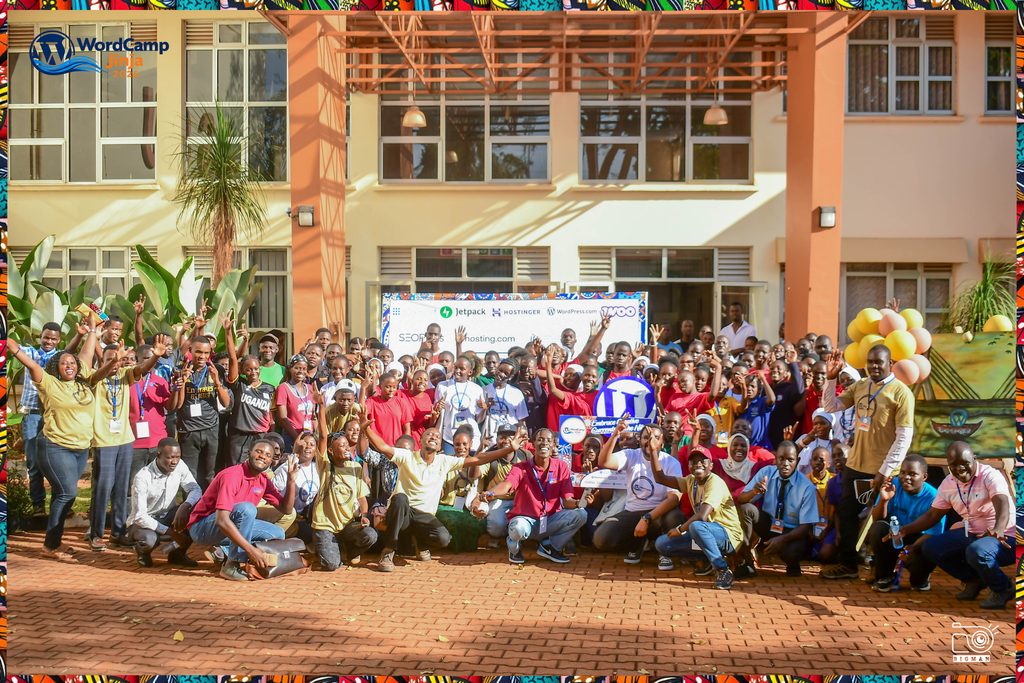
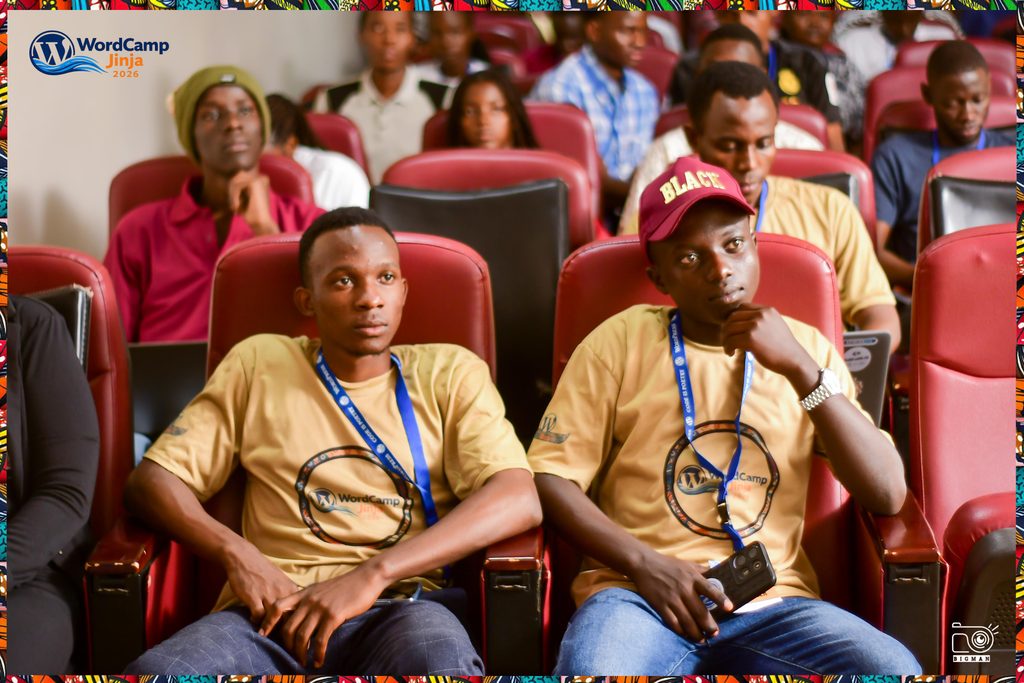
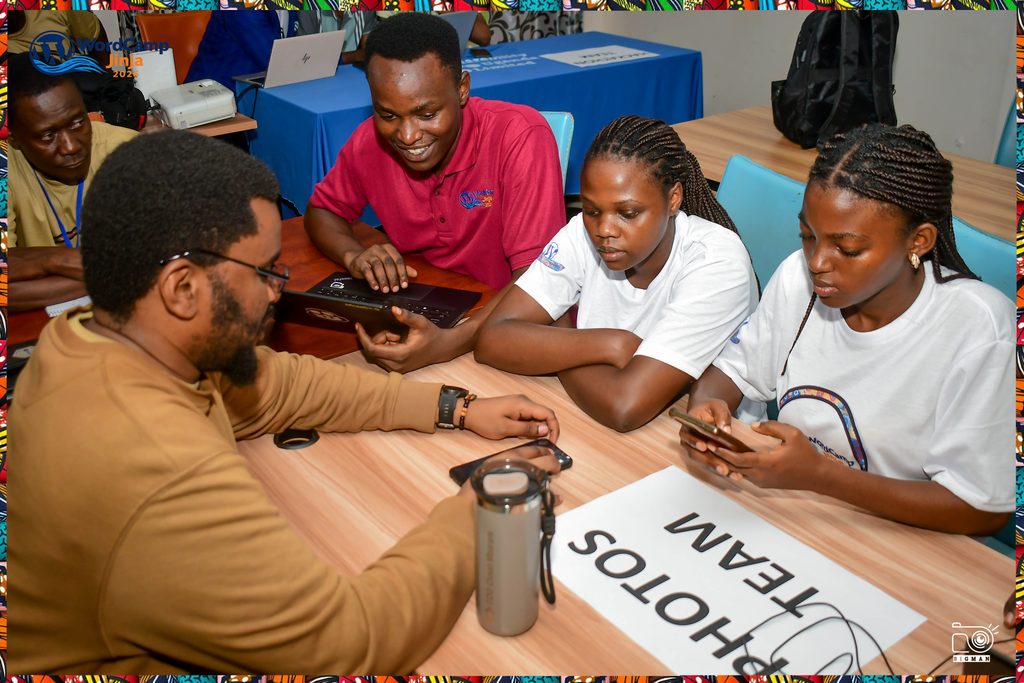
On 19th and 20th September 2026, the WordPress community gathered at Civil Service College Uganda, a venue close to River Nile, for the fifth edition of WordCamp Jinja. The event brought together more than 300 diverse participants across 2 days and 3 parallel tracks of sessions full of learning, collaboration and connection. In a city known for its flowing waters, creativity and ideas flowed too, as participants shared their experiences, explored new possibilities with WordPress and built relationships that would carry beyond the weekend.

Our theme, “Embrace Creative Currents on the Nile: Where Inclusivity Fuels Creativity,” reflected the mix of people and ideas in the room. Students sat alongside developers, designers, writers, educators, entrepreneurs and experienced WordPress contributors. Across three parallel tracks, everyone could find a way to learn, share or build.

Students and Creatives at the heart of WordCamp Jinja

Nearly half of this year’s participants were students. Their presence was felt throughout the event, from the speaker sessions to the labs and hackathon tables. We had students from primary schools, secondary schools and universities joining us for this year’s WordCamp.

Some came to explore WordPress for the first time. Others arrived with projects, questions and skills they wanted to develop. Sharing the same spaces with people already working in technology and creative fields gave them an opportunity to learn directly from practitioners and see where their own interests might lead.

One student in attendance found a creative way to remember his experience. Fascinated by the WordPress ecosystem, its generosity and inclusivity, he drew all the sponsor logos by hand so he could remember them after the event. His drawings became a personal record of the community he had encountered at WordCamp Jinja, a small but memorable expression of the curiosity WordCamp Jinja inspired.

Bringing young people into the community has been a continuing part of WordCamp Jinja’s work. Last year’s edition at Jinja Senior Secondary School brought the event closer to students; this year, their participation remained central even at a different venue. We hope the relationships formed over these two days continue at Jinja WordPress Meetups and in the projects students choose to pursue next.

Event highlights

Diverse Speaker Sessions

Our speakers brought different backgrounds and experiences to the stage. Sessions opened up conversations about WordPress and the wider web, including how people use technology to create, teach, solve problems and build livelihoods.

The value of these talks was in the experiences behind them. Speakers shared what they had learned through their own work, answered questions and gave attendees ideas to take back to their studies, organisations and businesses. Thank you to everyone who prepared a session and made the journey to Jinja to share it with us.

Charity Website Hackathon and Contributor Sessions

The Charity Website Hackathon returned as one of WordCamp Jinja’s most practical activities. Participants and facilitators worked together on WordPress projects for organisations seeking to establish or improve their online presence. The teams had to think about real needs: what information a visitor should find, how to organise it and how the organisation could keep its site useful after the event.

For newer participants, this was a chance to learn by working through a real project with support close at hand. For experienced developers and designers, it was a chance to mentor others and put their skills to work for the wider community. The work begun at the hackathon can continue beyond the conference as teams and organisations develop their websites further.

Contributor activities connected that local work to the wider WordPress project. Attendees explored the idea that contributing to open source goes beyond writing code: people can help through photography, translation, testing, documentation, training and community work. There were a lot of new contributors who were taken through the contribution journey by table leads. We hope that for those that took their first steps, WordCamp Jinja will be the beginning of a longer contribution journey.

Hands-on Labs

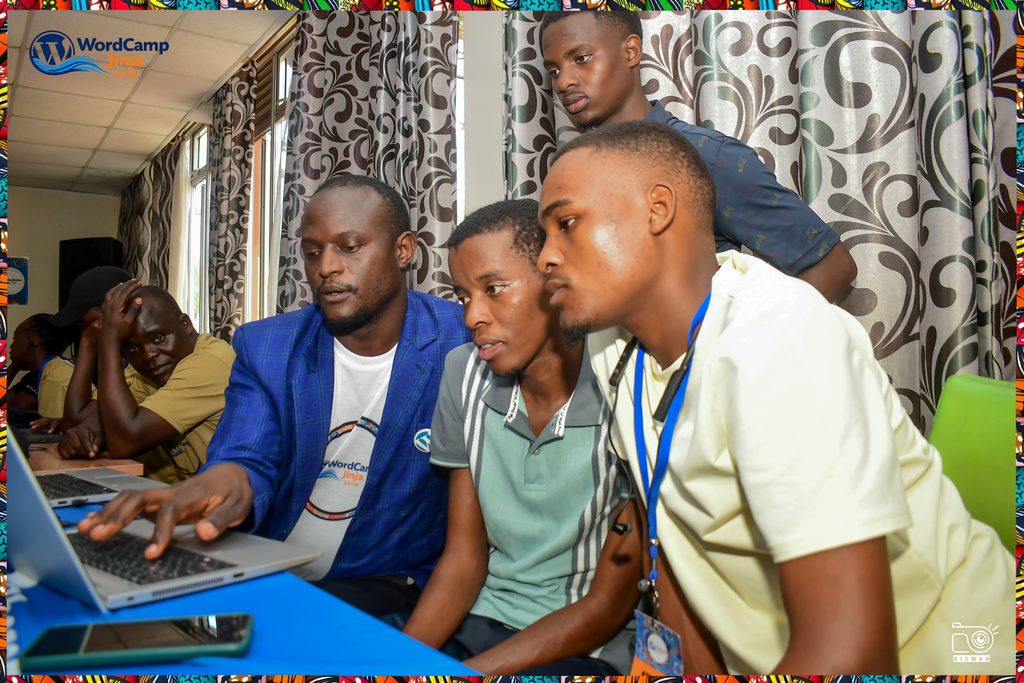
The Hands-on Labs offered a different pace from the speaker sessions. Instead of only listening, participants could practically follow a facilitator on state of the art computers, try something themselves and ask for help when they needed it.

That kind of guided practice matters, especially for people who are new to a tool or trying to turn an idea into something they can build. Thank you to the facilitators who prepared the activities and worked directly with participants, and to the volunteers who helped make the sessions run.

Memorable moments, connections and networking

Some of the weekend’s most useful moments happened away from the front of a room. Over lunch, in the corridors and between activities, attendees met people from other communities, exchanged ideas and caught up with friends they had met at earlier WordPress events.

For a student attending for the first time, a conversation with a developer or designer can make a possible career feel closer. For returning community members, it was a chance to meet new collaborators and hear perspectives they might otherwise miss. Those connections are part of what keeps WordCamp Jinja going after the closing session.

Celebrating at the Source of the Nile

The celebration continued at Source of the Nile for our after-party, where attendees, volunteers, speakers, facilitators, sponsors and organisers were welcomed to the Source of the Nile. Unbeknownst to them, there was a surprise awaiting: an after party aboard a double-decker boat. The boat ride took them on a tour of Lake Victoria and finally landed at the actual source of the Nile itself, where they learned about its history before taking time for photos together.

The Nile has been part of WordCamp Jinja’s identity across previous editions. This year, gathering there brought our theme back into focus: people with different skills and experiences had come together, learned from one another and added something to the community.

The people who made it possible

WordCamp Jinja is built by volunteers. Long before the doors opened, the organising team was working on the venue, programme, speakers, communications, sponsorships, registration and practical activities. During the event, volunteers welcomed attendees, supported speakers, guided participants and helped the different spaces run smoothly.

To our attendees, thank you for showing up ready to learn and share. To our speakers and facilitators, thank you for the time and care you put into your sessions. To the hackathon teams and contributors, thank you for building and giving back. And to every organiser and volunteer, thank you for the work people saw and the work they did not.

We are also grateful to our sponsors Jetpack, Hostinger, WordPress.com, Woo, Hosting.com, SEOPress and Infinity Computers and Communications Company (i3c) and to our continued local community partners for supporting an accessible gathering for people at different stages of their WordPress journey. Their support helped bring this fifth edition to life.

Relive the weekend and keep in touch

You can explore photographs from the event in our WordCamp Jinja 2026 photo album:
https://photos.app.goo.gl/Fd61HxxyNT8xK4Ni7

WordCamp may be over, but the learning continues. The Jinja WordPress Meetup will keep bringing people together to share skills, contribute to WordPress and build on the projects and relationships started here.

Thank you for embracing the creative currents with us. See you at the next WordPress Jinja event!


bbPress: bbPress 2.6.20 is out!

bbPress 2.6.20 is a security and maintenance release. Everyone running bbPress should update. 🔒

This release strengthens topic and reply password validation and keeps bbPress post shortcodes literal in ordinary WordPress content loops. It also adds a site-wide Forum Status setting with Open, Closed, and Frozen modes. Existing sites remain Open unless that setting is changed.

The maintenance work improves BuddyPress profile actions, group topic routes, activity visibility, and group-forum access. It also restores compatibility for subscription links in third-party theme packages, preserves moderation forms after validation errors, and includes fixes for notifications, converters, widgets, profiles, topic and reply administration, and restricted-content visibility.

bbPress 2.6.20 still requires WordPress 6.0 or newer and PHP 7.2 or newer, and is tested through WordPress 7.1. The database version remains 264, so no database upgrade is required. The 2.6.20 upgrade notes cover compatibility details.

These changes are also in the 2.7 development branch, which remains 2.7.0-alpha-4. Thank you to ahillmortons, alejandroescobar89, bor0, bradleyt, chefranov, dd32, deborah86, Dermes, diegootgs, dilip2615, fraph24, hardel, imath, immeet94, iworks, jgasba, josephscott, konnektiv, lmstearn, mehrazmorshed, michael8888, mike80222, obenland, Palagrin, peopleinside, r-a-y, robin-w, SirLouen, tobifjellner, wpturk, and zaerl for reports, patches, testing, and review.

Download bbPress 2.6.20 from WordPress.org, or update from your WordPress dashboard.


Open Channels FM: The Hidden Dependency Problem in Open Source Infrastructure

When we think about what keeps the Internet humming, most of us imagine massive data centers and super-fast connections. Fewer people realize that our everyday digital experiences often depend on the efforts of a very small group of individuals. Recent analysis revealed that in many essential open source projects, just one or two people are […] 

#237 – Robert Abela on WordPress Security and the Battle Against AI Threats

Transcript

[00:00:19] Nathan Wrigley: Welcome to the Jukebox Podcast from WP Tavern. My name is Nathan Wrigley.

Jukebox is a podcast which is dedicated to all things WordPress. The people, the events, the plugins, the blocks, the themes, and in this case, the state of WordPress security in 2026, and the battle against AI threats.

If you’d like to subscribe to the podcast, you can do that by searching for WP Tavern in your podcast player of choice, or by going to wptavern.com/feed/podcast, and you can copy that URL into most podcast players.

If you have a topic that you’d like us to feature on the podcast, I’m keen to hear from you, and hopefully get you, or your idea, featured on the show. Head to wptavern.com/contact/jukebox and use the form there.

So on the podcast today we have Robert Abela.

Robert has been working in IT security for 25 years, ranging from antivirus software to web security scanners, and for the past decade has been running Melapress. A company focused on WordPress security plugins, particularly around user visibility, authentication, activity logs, and 2FA.

Robert is here to talk about the 2026 WordPress security survey. This is an annual project now in its fourth, or fifth, year gathering data from a wide range of WordPress professionals across agencies, enterprise teams, freelancers, and product owners. The conversation today is focused on the biggest security challenges and trends facing WordPress users in 2026.

We start off with some sobering stats. Over 67% of survey respondents reported experiencing at least one security incident in the past year, and concerns about WordPress security remain high, especially among less technical users.

We chat about the disconnect between awareness of security threats and actually taking steps to mitigate them, such as breach recovery plans and team training.

The discussion also explored the different types of risks that worry site owners. Site downtime, defacement, reputational damage, data loss, and even legal compliance issues. How the shakeout depends on the type of site, whether it’s e-commerce membership, a news outlet, or a simple brochure site.

We also talk about the tendency for even experienced WordPress users to take a reactive approach, only addressing vulnerabilities after something has gone wrong.

Towards the end of the episode, we discuss the rising impact of a AI on security, the explosion of AI facilitated vulnerabilities, and the shifting landscape of risk and response. There’s a healthy dose of reality, some optimism about the tools and best practises available, and plenty of good advice, especially for smaller teams and freelancers who may not have access to enterprise level resources.

If you care about keeping your WordPress sites secure, or want to understand where the community’s biggest concerns and opportunities are in 2026, this episode is for you.

If you’re interested in finding out more, you can find all of the links in the show notes by heading to wptavern.com/podcast where you’ll find all the other episodes as well.

And so without further delay, I bring you Robert Abela.

I am joined on the podcast by Robert Abela. Hello, Robert.

[00:03:48] Robert Abela: Hello Nathan. Thanks for having me.

[00:03:50] Nathan Wrigley: You’re very welcome. Nice to have you with us.

We’re going to chat today about internet security, but we’re going to be looking back over the past year, so the year 2026. Robert, can tell us a little bit about the company he founded, works for, and so on. It’s called Melapress, you can find out about that in just a moment.

But I would like to draw your attention to something which is going to really be the fulcrum of what we talk about. It is their 2026 WordPress Security Survey. Now, the easiest way to get that is probably to go to wptavern.com, search for the episode with Robert in it, and I will make sure it is linked in the show notes there.

But it might be a good idea to read it, because in about 10 minutes, you’re going to be able to capture absolutely everything that we’re talking about today, and you’ll get all of the data and, what have you. But that’s going to be the point of this episode, summarizing what happened in the security space in WordPress in 2026.

Robert, I guess there are a few areas in the WordPress space where it’s pretty important to know that we know, that you know, what you’re talking about when it comes to security, because we don’t want to have a lot of hot air from somebody who’s not experienced. So it’s an opportunity for you really to give us your bio and tell us a little bit about what you’ve been doing in the WordPress space, particularly around security, the companies you’ve worked for, the things that you’ve founded and so on. So over to you, Robert.

[00:05:07] Robert Abela: Thanks. I’ve been working in IT security for twenty-five years. I’ve always worked for software companies, software startups which worked in security industry. We used to do antivirus software, web security scanners, et cetera. I’ve had different positions. I started as systems engineer, QA, product management, project management, almost any field.

Anyway, and the last ten years I founded Melapress, and it’s a WordPress plugin business, and basically we develop a number of security plugins for WordPress. The security we do, we don’t do the typical firewall malware, et cetera, like the other, brands. We mostly focus on user visibility and authentication. So basically we have an activity logs plugin, and we also have a plugin for 2FA, passkeys et cetera. So we are focusing much more, on what happens post login once someone logs into WordPress, rather than the whole hardening and protection.

[00:05:56] Nathan Wrigley: Thank you for that. So anybody that’s interested, anything that we mention today, including the URLs of the companies that Robert has just mentioned, so Melapress, you’ll be able to find those in the show notes as well.

So the 2026 WordPress Security Survey, how many times have you actually run this? So obviously we’re looking at the 2026 version. Have you done this a couple of times and refined the way that you’ve done it and the way that you’ve surveyed over many years?

[00:06:21] Robert Abela: Yes. I’m not sure if this is the fourth or fifth year. But yes, we do every year, we’ve had more respondents. This year, by the way, it was the highest ever with 219 respondents. We had more, but before we publish all the results, we go through the sheet. Maybe there are some duplicates. Maybe some of them are not correctly filled in, et cetera.

But yeah, we’ve been doing it for around four years, and we’ve also fine-tuned from where we gather the data. For example, the first year, we’re only sending our newsletter basically, but this year we’ve done a lot. We’ve promoted the survey through third parties. We’ve gathered responses from WordCamp Europe, in person, through a number of other conferences, et cetera.

So while there is still a percentage that most probably are our users or our clients, still the biggest percentages is spread out to a wide range of different type of WordPress users, ranging from people who work for agencies, developers, designers, but also people who work with WordPress in bigger enterprises or businesses.

[00:07:15] Nathan Wrigley: Okay, so yeah, caveat emptor. With that in mind, the limitations, or otherwise, of the numbers that you’ve got represents what you’ve got in this survey.

And essentially, what it boils down to is a, it was kind of a bunch of questions which then led to a bunch of information being spat out the other side. And I’ve summarized it into about 10 bullet points. It may very well be that I’ve missed a few bits and pieces, but be interesting to go through, and you can lend your experience as to whether or not there’s been any change, whether things have got worse, whether things seemingly have got better.

We’ll begin, if it’s okay with you, with the top item, which I suppose, came out, which was a concern around WordPress’s security, or the things that can happen around WordPress and security. And what came out of it was that 7.85 out of 10, so 78 and a half percent, I suppose you could describe it as. They were developers who were expressing basically that they were concerned.

Now, I don’t know if you have more telemetry, like what concerned means, but off the face of it, that seems like quite a high number. If the platform that you’re using to build websites, you are in the sort of mid-70s concerned, is there anything you wanted to add to that or is that just the sort of top level statistic?

[00:08:28] Robert Abela: No. That was like a top-level statistic, a question we ask, like if people are concerned or they have worries about their WordPress, the security of their website.

What’s funny is the last few years, the level of concern has been the same. However, also we’ve noticed that people who have some sort of recovery plan, et cetera, also remains the same. So the level of concern has remained the same. So the majority of people know that something can happen to their WordPress website, especially now with AI, et cetera. It’s even more, things are moving much faster.

However, it seems like people are not taking the next step, as in like taking action to make sure nothing happens. What I’ve noticed as well, once we break down those who have concerns and what job they have, if they’re developers, or with their security people, et cetera. There’s this correlation, like, the more informed someone is, the more is involved in the tech aspect of the website, the more understanding they have on how things work, the less concerned they are.

So maybe it could also be education or awareness because of course, if you don’t know about how something works, then of course you are much more concerned. How you’re going to protect it? However, if you are, let’s say, a developer and has an understanding of sessions, cookies, the usual things, like passwords, maybe you’re a bit less concerned because you feel you are a bit more in control of how you can protect your website and what you can do.

[00:09:39] Nathan Wrigley: It seems like on the face of it, I should say, it seems like 78%. It seems like quite a lot.

[00:09:44] Robert Abela: Yes.

[00:09:45] Nathan Wrigley: If I had any kind of intuition, let’s say I was to go out into my car and drive around the street, if I thought that 78% of the time there was going to be some potential accident. Or I was worrying of the time about the possibility of an accident, I don’t think I’d be getting in the car. So it’s kinda curious. But, let’s move on.

So the next data point that dropped out was 67.7%, so let’s call it 68% of respondents. Now this is fairly shocking, and maybe this number will actually start driving up in the years to come, and we can get into that later.

68% of respondents had experienced at least one known security incident, with many multiple incidents. Now, that really is shocking to me. Closing in on 70% of people have had some kind of incident. I don’t know what, or maybe you do, what the magnitude of that is, but did that surprise you? Did that seem like a really large number?

[00:10:38] Robert Abela: 67.7 of all respondents, correct, they reported one security incident. I’m not surprised because almost everyone I speak to at WordCamps, even non-WordCamps, other events, someone down the line has had some security issue. Not just with WordPress, but especially with WordPress. And the funny thing, it’s not even funny, but 13.2% of those are repeat targets, which means they have experienced more than five security incidents.

Now, why does it happen? There are a number of reasons. Outdated software, lack of user awareness. In fact, what’s really more concerning is, I have some numbers here actually I can tell you. Yes, we’re still looking at some other statistics. Only 27.9% reported like they have some sort of training for their users. And only 37% use logs. At least 2FA’s a bit higher, it’s around the 40% something. I don’t have the exact number right now.

So yeah, so I’m not surprised because there is still a lot that can be done from website owners, from agencies, from everyone, to make sure we take down that number, and not everyone. Or so not the majority of people experience some sort of security incident on their website.

[00:11:41] Nathan Wrigley: Yeah, it’s curious. It’s not really a conversation. When I’m at events or chatting to fellow WordPressers, security is not the default conversation that I have, because I’m not a security person. So I end up chatting about, I don’t know, custom post types and how to do various things that I’m doing. Maybe podcasting in the WordPress space or something along those lines.

You, I guess, are having these conversations, and it’s very much in the territory. It’s in your wheelhouse. And so maybe it’s not a surprise to you that 67-plus percent of people have had something in the last year. But, on the face of it, that just seemed like so many. If I see 1,000 people at a WordCamp and I think, “Well, 670 of those have had a problem during the course of this year,” gosh that really does seem like a systemic problem.

And I know that outside of the WordPress community, WordPress gets a bit of a hard rap, on the security front. It’s insecure and what have you, and, all of the caveats. We know that really isn’t typically the case for WordPress Core. Tends to be the addition of code and plugins and themes that adds that on top. But I’m still surprised, feels almost like if the mainstream press got hold of your survey and just pull out that one statistic and bandy it around, it doesn’t feel great, if you know what I mean.

[00:12:53] Robert Abela: Yes. I think WordPress gets a lot of bad rep also because it’s very popular. As in like pre-WordPress, I’ve used web servers before as in like custom PHP websites, .NET, IIS, Apache, et cetera. Websites used to get hacked as well in the thousands. The thing is that you couldn’t point your finger to one type of website, you know because they were all custom. So these problems have been happening since we started having websites, quite frankly.

With WordPress, unfortunately it happens and we have a bad rep because I think there are two things. Look, first of all, it’s very popular, so it’s always there. If WordPress power is around 42, 43% of the, or maybe it went a bit down, but anyway, let’s say 40%.

[00:13:30] Nathan Wrigley: Roughly, yeah.

[00:13:32] Robert Abela: Yeah, The chances, for every 10 websites, four of them are going to be WordPress. That’s a common denominator. So of course, WordPress is going to get a lot of attention.

I also think, again, goes hand in hand with how many people have security concerns. WordPress has made it very easy to launch your own website, which is a good thing. However, of course, those same people who launch their own website, maybe they don’t have the technical understanding and experience what it takes. Because setting up a website’s one thing, but keeping, managing a website for a year, two, three, and growing it, adding new functionality is another thing. So most people might not have the experience that they have, so of course, it’s much easier to find security issues with these type of websites.

[00:14:10] Nathan Wrigley: Okay, we’ll move on anyway. So we’ll talk about the concerns. So you’ve obviously polled your recipients of the survey about the kind of things that they were worried about. So what are the outcomes that they fear the most, if you like?

And website availability, so the taking down of a website came in at number one, with 55.8. And then in no particular order, but these are the two that I picked out. The fear of being defaced, so the website in some way being amended, or there being some reputational damage because of what the amendment was. I don’t know, maybe there was some imagery, or some slightly political content that ended up on your website.

That was just slightly south of the availability, so that was 54.2%. And then dropping a full 10%, so 46.4%, was the worry about data theft or loss. Frankly, I’m not surprised by that. I guess any developer’s nightmare is their website actually disappearing off the internet. That’s number one, so that doesn’t surprise me.

I remember in the day, 15 years ago, defacement was the thing. Honestly, I can’t say that I’ve been browsing the internet recently and seen something that’s been defaced. It seems like the hackers have all moved on. Maybe there’s things buried in the source code that I don’t know about.

Yeah, it doesn’t surprise me that the availability is the main thing. But I am surprised that data loss comes in third, if you like. I personally would have had that as number one, especially, if you’ve got a, I don’t know, an LMS, or you’re connecting with a CRM, or you’ve got form data which potentially is capturing something personal that the GDPR would worry about. So there’s no question, just if you want to comment on those particular things, go for it.

[00:15:42] Robert Abela: No, definitely. Those are the numbers based on all the respondents. But if you start breaking down the numbers, there’s more nuance to, to these things. So for example, if you look, those who are concerned about website availability, or defacement, are usually those who have content websites. Mostly based on content, news, magazines, et cetera. Those who are more concerned about financial loss or data theft are more the e-commerce websites.

[00:16:08] Nathan Wrigley: Oh that makes sense. Yeah.

[00:16:09] Robert Abela: The membership websites, et cetera. In fact, the membership websites are as well more concerned, for example, about compliance because of privacy. So those numbers, like fifty-five point eight percent, those are from the all respondents. But as soon as you break all that down, it differs a bit on the type of website you have.

And it’s expected because if you have an e-commerce website, of course you are dealing with billing details, payments, and all this stuff. If you have a membership website, maybe you are also dealing with payment details, but you are also dealing with much more data. Maybe you have some sort of internal chat. People are sharing their addresses on it, their personal information. So that you are more concerned about GDPR or any sort of compliance, et cetera.

But if your main selling point is if you have a content website, a news website, and your main selling point is your website being available, then of course that is your biggest worry.

[00:16:53] Nathan Wrigley: That’s an interesting split of the data there. That makes perfect sense, of course, now that you say it in that way it really is obvious.

So that was you polling your respondants respondents there, and you were trying to figure out what their worries were and what they were into and all of that kind of stuff.

And then we sort of to move to a different realm where despite all of that being said, so, you know, got a lot of people worried. We’ve outlined some of the different worries that they have, depending on the type of website that they’ve got.

From all of that, if you’d have ended the survey there, I would have assumed at that point that everybody had something in the back pocket to pull out, an SOP or something like that, to pull out in the event of an actual problem. If data theft is apparent, we do this. If the website goes down, we do this. But your survey reveals entirely the opposite.

So the high numbers on the one side, the fear numbers, are not mirrored by the what we’re going to do about it numbers, because you go straight into the high 20s, so 27.9% had a breach recovery plan. So how to get back from a problem with your website being, let’s say, hacked, let’s use that word. And 26% provided some sort of training for their team, some sort of security team training, that kind of thing.

Again, does that surprise you? You’re in this space. Maybe that’s really typical, but given the high levels of concern, there seems to be a real disconnect with what we’re going to do about it. That’s curious.

[00:18:18] Robert Abela: I’m not surprised, in the sense, it’s very common. The majority of people, especially nowadays, there’s much more knowledge that, yes, websites can be hacked, this can happen. However, that doesn’t translate. People don’t have the, I don’t know if it’s the resources, the means, the time to actually take action on it, to prepare some things. So, I’m not surprised.

Again, similar to what we discussed before, there’s a bit more nuance to these type of numbers because you said only 27.9% has a breach recovery plan. Actually, that’s based on all the respondents, but typically the number is much less, because when you look at it, from the respondents, from all those who have a security breach, from those 27.2%, 70.2% which have control in place are corporate or brand websites, which means they have their own in-house team. Only those, 70% of those have their own, have their activity logs, have their firewalls in place, have a recovery plan in place, et cetera.

So the number of, let’s say, the non-branded, the smaller websites, yeah, they have absolutely nothing. They have no sort of recovery plan or anything like that. In fact, the numbers are much smaller. Only 23% of those websites typically have some sort of recovery plan.

[00:19:23] Nathan Wrigley: Okay.

[00:19:24] Robert Abela: I’m not surprised because usually, especially if you’re an enterprise, or a bigger business, you are bound by more compliance. Maybe you have more security people on board who are much more aware what can happen of what they need to do. But yeah, the average website doesn’t have these things.

[00:19:38] Nathan Wrigley: Yeah. I wonder if your data here might be skewed by the type of correspondent that you got. So for example, who knows how many blue-chip companies, have submitted to your information gathering here. Perhaps not many, but maybe you got lots of WordPress community members, and so the data might be skewed in that direction. But that’s an interesting point. So dependent upon the nature of the website and the type of team they have behind it.

But it is still, regardless of all of that, it is still quite low. And I was using my analogy earlier about insurance, and I think that applies here. Insurance is the most uninteresting thing to purchase because you spend this money and, let’s say for example, you got home insurance. I would imagine most people typically go through a year and they never make use of it. Sorry to anybody listening who has obviously had to make use of that. But the moment you need it is the moment that you’re glad of every single penny that you’ve sunk into that, and I guess that applies here. If we can persuade people to get that data breach recovery plan, whatever it may be, have that in your back pocket, that would be a useful thing to have.

[00:20:38] Robert Abela: Yeah. As I’ve said in the beginning, I’ve been working in IT security companies, security software companies for 25 years. All of them, the most common sales opening, like sales reason, like people coming to us like, “Hey, this happened, so now I need this.” They’re always after they’ve been hacked, after they’ve been a leakage, after there’s been something wrong.

Very few proactively come and as I said, like the bigger enterprise companies, because they have certain regulations and stuff and certain budgets that they invest in these things. But the average website, yes, first they have to experience something, and then. I think it’s, in all fairness, I think it’s common human nature. It’s not just about IT. We tend to be all humans. We tend to be like, “Oh, we’ll see later,” and then if it happens, “Ooh, I should have…” it’s always like that.

[00:21:17] Nathan Wrigley: Well, there’s also that calculus of how much time does it take to recover. So for example, if you’ve got a brochure site, and you’ve got backups going back for many many months you can restore to a point that you’re fairly sure that everything was actually fine, and the breach has been mitigated by going backwards in time. But it’s just all the wasted time. It’s the wasted time going through the backups and seeing, okay, is this backup, does it have the malware in as well? Okay, that one does. What about this one? What about this one?

And there’s no knowing how long that’s going to be, and the minute you step, as you said, into e-commerce and you’ve got transactions happening every couple of minutes, and then you’ve got receipts and you’ve got to fulfill those orders, and somehow, oh boy, yeah.

[00:21:59] Robert Abela: Yes. Then it’s a different ballgame. Yeah.

[00:22:02] Nathan Wrigley: Different ballgame isn’t it? Yeah.

Okay, so the next point that we’re going to move on to is actually one that you probably just made. And it’s that the detection in most cases, well actually not most cases, in many cases. So 42.6% of your respondents said that their detection is mostly retroactive. So that is to say the thing has already gone wrong. Somebody in the 42.6% of the case is because they see something on the website. They’ve noticed that something isn’t quite right, something looks out of order.

38.4% because they were actually inspecting the logs. That tells me that whoever’s inspecting the logs is doing diligent work. That’s kind of interesting. So don’t know if you want to comment on that, but basically a lot of people are figuring this stuff out after the thing has happened, as you described, not before the thing has happened.

[00:22:51] Robert Abela: Yes. So there are four criteria. So 42.6%, as you said, is common website behavior, either detected by their team or by clients. 38.4 via logs. Now, the logs is a bit, it can be reactive and proactive, because with the logs, you can actually, in fact, we have some notes on this, but I don’t have the exact numbers right now. Because some of them were actually by someone analyzing the logs, but some of them were actually because someone has configured notifications based on the logs, like a sort of intrusion detection system.

And so if, I don’t know, if X login happens after X time, whatever, please send me an email or an SMS, and that, it’s still reactive in a way, but at least they could act right away as soon as it’s happening. Yeah.

[00:23:31] Nathan Wrigley: Yeah kind of proactive reactive, isn’t it? That’s a really interesting subcatagory.

[00:23:33] Robert Abela: Exactly, yeah.

[00:23:34] Nathan Wrigley: Yeah.

[00:23:34] Robert Abela: So yeah, but yeah, it’s still reactive because then you have 35.6% they knew through their web host, and 30% they knew through some sort of malware scanner alerts on their website, et cetera.

[00:23:45] Nathan Wrigley: Okay. Again, just kind of interesting data coming out.

So the next one, incidents most commonly resulted in downtime for the website. So that’s pushing up to 70%, 68.4% of whatever happened, resulted in some downtime. And then I don’t have the numbers for the following data, but I guess it decreases from here.

The next thing was reputational damage. That was a result of some sort of incident. And then search engine ranking is affected. That’s an interesting byproduct.

This one’s brutal. Client trust disappearing. That’s really interesting. And then in some cases, lost revenue. I imagine the lost revenue is being described as in some cases, because, as we described earlier, if you’re dealing with revenue, you’ve probably got more bulletproof security measures in place.

But the ones that sort of jump out to me there aren’t the downtime, because I would’ve assumed that. It’s really the curious byproducts of things like the reputational damage, the search engine damage. You can’t really get your hands on those, can you? There’s no real way of knowing what that’s going to look like or feel like, or how that’s going to affect your business this year or next year.

Just to know that, you wake up one morning to discover that you were in first place on Google after six years of hard SEO work, only to discover that you’re now in fourth and descending fast, that’s pretty brutal.

[00:25:01] Robert Abela: Yes. And in fact, if you break down those numbers a bit more, like 45.9%, there’s loss of search engine ranking, and that happens usually when search engines detect you have issues. I don’t know if you remember, Google used to have that page sometimes.

So that happens. When that happens, when the search engine themselves realise there’s an issue, you lose a lot of rank. The penalty you get there is very heavy. In fact, only 14.5 of those who have had some issues with the website has lost ranking because they have discovered their issues before the search engine did.

So again, that’s why you should be a bit more proactive because if your search engine finds out before you, the penalty, as you said, and you cannot really quantify it because God knows how long you will remain. As you said, if you were position one for six years in a row, now one fine day you’re on the second page, God knows how much work you need to go back up, and you cannot even calculate what the revenue loss is.

But when it comes to revenue loss, again, it’s the same. There are some websites, I’ve seen some websites where like they generate $70,000 per hour. So for every hour down, that’s $70,000 gone.

So yeah, there are lots, and of course, the reputation, on top of the reputation, there’s also compliance and legal consequences, especially in the US. Things are becoming much stricter now. If you had some issue, some customer data has been leaked, you have problems with the law, fines, and other similar stuff. So, the financial damage to all of this, of your website getting hacked, is very high.

Not just the reputation, losing customers, you might end up in court. You might lose your search engine ranking, and that is why most probably it’s a good idea to become a bit more proactive rather than reactive. Or it’s almost impossible to, there is no 100% secure solution, and that is why I think it’s very important to have good hardening, but also good monitoring, the whole process, the whole 360 degrees, the whole cycle.

[00:26:44] Nathan Wrigley: It’s such a curious industry that you’re in because, how to describe this? It would seem, or at least, it would be possible to perceive that this security survey is perfectly aligned with your business goals in a way. There’s loads of problems out there on the internet. There’s multitudes of ways that things can go wrong, and for every one of them, there’s, a WordPress solution out there.

But I know Robert. We’ve met many times before. I get the intuition that’s really not why you’re doing this, although somebody listening to this might have that sort of slightly, I don’t know, cynical approach that, Robert’s just saying this so that he can launch his Melapress products at you. Just put our minds to rest on that score. Why do you actually carry out this survey?

[00:27:25] Robert Abela: Good question. Actually, our plugins only address part of the security. There’s much more when it comes to firewalls, et cetera, that I still say hardening you still need. We don’t even cover it.

No, we do it, honestly, it started around four or five years ago, for me, it was just curiosity. It sounded like an interesting to do. Hey, let’s do a survey, just experimenting, et cetera. And we had very good response, and now we’re just, doing it honestly.

Like I really believe that by knowing, this is not just about WordPress security, about everything else. By knowing where other people are doing it wrong, you will learn from it. By knowing, okay, clearly I can see, for example, as we were saying, like seventy percent, seventy point two percent of enterprise and marked businesses usually have logs, usually have firewalls, et cetera. Maybe we should aspire more towards them and be more like the average website should have a bit more like things like that, and maybe they’re doing something right.

So yes, there is a lot to learn from surveys in general, not just this, any type of survey. There is usually a lot to learn. And that’s why we’re doing it as well, because from the first time we’ve done it, which started really as a curiosity project, we got so much good feedback. And actually the second year people were asking us if we are going to do it. Because yeah, people learn from these things.

I mean, of course there’s the benefit of it, hopefully it will promote as well a bit our plugins. But anyway, it’s going to promote all other type of security solutions. We are not, in fact, the survey is not tailored just for our plugin. It talks about everything. As I said, the whole security cycle. You have the hardening, you have the monitoring, updating, et cetera, and we only do one part of it, the monitoring aspect, basically.

[00:28:50] Nathan Wrigley: Before we move on to our sort of final bit, which I want to concentrate on AI, I’m just going to wrap up the security bit just by summarizing what comes towards the end. And it’s less about numbers, and it’s more about just conclusions that may have been drawn. But most of it, I think, would be fairly obvious from what we said. So I’ll just summarize it a little bit.

The first one is that e-commerce and membership sites tend to have greater security concerns and stronger practices. That kind of makes sense. I guess it reflects the nature of the business they’re in, and the kind of data that they’re holding, and the legal compliance that they may need to be concerend with.

In-house teams are more likely to have recovery plans. Again, I presume that’s fairly obvious. The boss, the head of the pyramid can sit down and say, “Okay, it’s your job now to crack on and do that. You’ve got a week to figure out all this sort of stuff,” and what have you. Whereas a freelancer sitting in their own office, there’s always regular work to be built, sites to be built and other things to do. So I can well imagine why that’s the case.

And sites, again, fairly obvious, sites with repeated security incidents tended to have stronger controls in place. Today, presumably, it’s a case of once bitten and all of that. Once you’ve actually had this nasty stuff happen to you, you’re pretty likely to make sure that does not happen again.

In summary, I suppose the reports really, the recommendations are focus on prevention, detection, and recovery rather than simply adding in more security tools, would be the way that I would describe it.

Okay, let’s move on then just before we finish. It is, as we’re recording this, it’s September 2026. In the more recent past, I want to say, I don’t know, the last two months, something like that, the WordPress security news bulletins have been on red alert really. We’ve had some charts being put out on social media which show the amount of vulnerabilities discovered, and also the amount of AI-based plugins that have gone into the repository. The supply chain attacks that have suddenly become a thing. A lot of it really because people can corral AI to do mischievous stuff and what have you.

I don’t really have a question, but I just wondered if you had a comment on where we are in September 2026, because it does feel as if there’s quite a lot of, there’s a lot of scope to be very doomer at the moment. It almost feels like the AI is winning the arms race, but maybe that’s not what you’re thinking from your end.

[00:31:04] Robert Abela: No, it looks a bit negative. I wouldn’t say AI is winning the race. Actually, people with malicious intent using AI are winning because AI is neutral in a way, like it depends on what people ask the AI to do.

[00:31:15] Nathan Wrigley: Yes.

[00:31:16] Robert Abela: But it is worrying, yes. The graph you are mentioning, I saw a graph shared by John Blackbourn, yeah, about the number of issues reported in the HackerOne WordPress vulnerability program, which is insane.

[00:31:28] Nathan Wrigley: Yes.

[00:31:29] Robert Abela: And they received more reports in the last week than they ever did in a whole number of months. So yes, it is worrying. You can look at it both ways. The same way attackers can use AI to find issues. We are doing it ourselves as well, quite frankly, because whenever there’s a new model out there from all of these vendors, most probably attackers are going to use them to scan our code, et cetera. So we’re doing it as well.

We always used to do the manual security analysis, et cetera, but now that we have AI, with every release, we just hammer the update and try to find as many issues as we can.

The reality is also that some, if not many of these vulnerabilities are not actually so easy to exploit. Like it’s really, the stars really have to align and it’s really, but still, it’s better safe than sorry. Because even though today it might be difficult to exploit a particular issue, in six months’ time, we might have technology that might make it very easy to exploit this type of issue.

It looks negative, but the same tools that attackers have, malicious users have, we have them as well. So it’s up to us to use them and be ahead of the curve, and use them proactively ourselves and before every update, during the whole development cycle. We should use them more often to make sure at least that we cover what other people can find before us.

[00:32:35] Nathan Wrigley: Yeah. I suppose the bit that I find curious is the optics of it. So, there was always this universe in which people would be able to throw dirt at WordPress because you know WordPress isn’t secure, and we talked about that earlier. It’s usually plugins and very rarely Core. Plugins, themes, additional code, what have you.

However, given that it would appear that people can stack 14 overlapping problems and create this one vulnerability from things that probably humans would never have conceived in the past. That then just lends into this narrative of, well there’s this deluge, this tidal wave of things that are coming at WordPress.

So I woke up this morning to discover in my feed BleepingComputer. I don’t know if you’ve seen this one yet today, but BleepingComputer have got an article with a CSV attached to it about yet another WordPress thing. And it just feels like that sort of day in, day out, there’s just another and another, and it’s that narrative that, that concerns me. It’s just that it gets away from us, that there’s one this day, there’s one this day, one this day, one this day.

And having to explain, “Look, calm down. That one was nothing. Okay, calm down. That one was also nothing. Okay, yeah, that one was something, but that one was nothing, that…” It’s just that constant fighting the narrative in an era where every day something seems to be out in the press, a problem that WordPress. Do you capture what I’m saying there?

[00:33:57] Robert Abela: Yes, no, and no wonder we get negative rep in the rest of the IT industry because, yes, we do get these news, and the numbers are very big. If you find a vulnerability in a plugin that has half a million installations, all of a sudden you see the news, “Oh, half a million WordPress websites are vulnerable to X.”

Unfortunately, yes. The thing is, WordPress in general, it’s very secure like. There are so many I’ve seen in my life, I don’t know how many custom web applications I have seen that are horrible in terms of security, like really horrible. It’s just because, of course, no one is seeing these because this might be a website in millions of websites, so no one is targeting. But WordPress, because it’s a popular platform, is going to be targeted.

But yeah, because the numbers are big, yeah, unfortunately, we do have a bad rep. And yeah, the news like to sensationalize things as well. So yeah, the rep is not good, no. But the reality is that it’s going to happen. It’s going to happen more often, most probably. It happened to us. All the vendors I’ve spoken to at WordCamp US and WordCamp Europe, they’re all the same. If you look at our plugins as well, maybe we used to get, I don’t know, maybe on average a vulnerability or two reported a year.

As soon as this whole AI started thing, all of a sudden within a month or two, you get like four, five, six reports like, “Whoa, what happened?” In just one week. It’s just reality. It’s up to us, as I say, we have to be more proactive. Of course, it’s easier said than done, but we have to be more proactive and try to use the same tools that attackers are using to make sure at least we detect them, yeah.

[00:35:13] Nathan Wrigley: Yeah, the bit that genuinely I find curious is what will be the calculus in terms of time that people can spend on this stuff. So as an example, if let’s say that by January 2027, many of us are having to spend a good proportion of every day, and by a good proportion, I don’t know, let’s say 30 minutes or something, browsing through the news to see if anything has cropped up. Or indeed to read the things that we know has cropped up because the fire hose of security news has gone through the roof.

This seems like it could happen, that we’ll all have to be mindful of it. And it’s just that sort of attritional wear and tear that, “Okay, really? Do I have to do this each and every day?” That will be interesting.

I suppose the flip side of that, curiously, is that it, how to describe this? It doesn’t do your business any harm because the more that people are concerned about their WordPress websites, the more security news there is, the more that they will be drawn to companies like yours. So it’s a very curious tightrope walk that you’re going to have to perform, I think as well.

[00:36:10] Robert Abela: Yes. Yes, it’s the reality. If I can do a shameless plug, at WordCamp US, I spoke about, WordPress user sessions and hijacking, and one of my lines was that all the things I had mentioned, but the talk is available on YouTube on the WordPress channel. All the things that I have mentioned, so many missed it, because if you look at user session hijacking, the bottom of it is all derives from user mistakes. A user making a mistake, that’s all it is.

And the reality is it all sounds dramatic. It all sounds like it’s the end of the world and apocalyptic. However, the reality is that, yes, nowadays, if you use a website, even as a user, you need to be aware of some basic things.

So yes, there are these news, and hopefully more and more people will become aware and more and more people need to become aware that yes, these are the dangers, these are like the risks of logging into a website nowadays. Of maintaining a website nowadays. It is. It’s like a double-edged sword. Like the news are making sometimes a bad rep for WordPress, but they’re also reaching more people that they need to wake up and say, “Oh, these are the risks, so we need to take action.”

[00:37:07] Nathan Wrigley: Yeah, it will be interesting in the face of AI vulnerability. It’d be interesting to see what the, let’s say hosting companies, let’s paint a target there. What they do to manage their stack, because obviously it’s going to be very important for them to make sure that the clients that they have. And how they position themselves in the news, and how they can portray the security solutions they’ve got. But as well as companies like you, you know, plugins and other firewall companies and things like that. Be interesting to see through 2027 how they manage that.

Okay. In which case we will wrap it up there. Just another quick reminder, go to the WP Tavern.com website, search for the episode with Robert Abela. You will be able to find the 2026 Melapress WordPress Security Survey over there. Download it, have a little bit of a look. And Robert, are you available anywhere online? Do you, other than Melapress’ do you actually make yourself available? And if so, where can we find you?

[00:37:58] Robert Abela: Yes, I’m active on LinkedIn, Robert Abela. I’m active on X.com, and I finally also have my own website. It’s more on personal things quite frankly, but yeah, it’s robertabela.me.

[00:38:08] Nathan Wrigley: In which case I will bury those in the bottom of the show notes as well.

[00:38:12] Robert Abela: Thanks.

[00:38:12] Nathan Wrigley: So that you can find those. Robert Abela, thank you for chatting to me today. I really appreciate it.

[00:38:16] Robert Abela: Thanks likewise.

On the podcast today we have Robert Abela.

Robert has been working in IT security for 25 years, ranging from antivirus software to web security scanners, and for the past decade has been running Melapress, a company focused on WordPress security plugins, particularly around user visibility, authentication, activity logs, and 2FA.

Robert is here to talk about the 2026 WordPress Security Survey, this is an annual project, now in its fourth or fifth year, gathering data from a wide range of WordPress professionals across agencies, enterprise teams, freelancers, and product owners. The conversation today is focused on the biggest security challenges and trends facing WordPress users in 2026.

We start off with some sobering stats, over 67% of survey respondents reported experiencing at least one security incident in the past year, and concerns about WordPress security remain high, especially among less technical users. We chat about the disconnect between awareness of security threats and actually taking steps to mitigate them, such as breach recovery plans and team training.

The discussion also explored the different types of risks that worry site owners, site downtime, defacement, reputational damage, data loss, and even legal compliance issues, how these shake out depends on the type of site, whether it’s e-commerce, membership, a news outlet, or a simple brochure site. 

We also talk about the tendency for even experienced WordPress users to take a reactive approach, only addressing vulnerabilities after something has gone wrong.

Towards the end of the episode, we discuss the rising impact of AI on security, the explosion of AI-facilitated vulnerabilities, and the shifting landscape of risk and response. There’s a healthy dose of reality, some optimism about the tools and best practices available, and plenty of good advice, especially for smaller teams and freelancers who may not have access to enterprise-level resources.

If you care about keeping your WordPress sites secure, or want to understand where the community’s biggest concerns and opportunities are in 2026, this episode is for you.

Useful links

Melapress

WordPress Security Statistics 2026: Melapress Survey Results

Robert’s personal site