Shifting barriers in tech reveal new questions about trust, safety, and sustainability in software.


Shifting barriers in tech reveal new questions about trust, safety, and sustainability in software.
Bowe Frankema shares how digital creation affects daily life and what bringing weirdness back to the internet means.
Learn how to sell your online course to companies: team seats, bulk enrollment from a CSV, and a certificate for every learner, using free Masteriyo LMS!
The post How to Sell Certificate Courses to Companies and Teams in WordPress appeared first on Themeisle Blog.
Munich’s shift to practical open source, Meta and Apple’s AI partnership, and NVIDIA’s hardware-driven open AI models
Due to the critical severity of the issues, site owners are encouraged to immediately update their installations of PHP. Your web host may already be working to update PHP and put web application firewall (WAF) rules in place to mitigate the vulnerabilities, but you should still check for updates from your web host and, if necessary, update PHP as soon as possible.
Within WordPress, you can see which version of PHP your site runs under Tools > Site Health > Info > Server. Many web hosts provide this information in your web hosting administration panel too.
These vulnerabilities are not specific to WordPress and affect any server that hosts a PHP application. No WordPress update is required or planned for these issues.
Versions of PHP prior to 8.2 no longer receive security updates from the PHP project.
If your site runs a version prior to this and you manage your own web hosting, you should consider taking your server offline while you prepare to update to a newer version of PHP. This advice is being published by several national cyber security agencies. To quote the UK National Cyber Security Centre:
Where immediate remediation is not feasible, organisations should consider taking the system offline until it can be fully mitigated.
Further information on wordpress.org:
Two critical PHP flaws let attackers run code on your server without logging in. Here’s how to check your PHP version and get your WordPress site patched.
The post Critical PHP Flaws Found: How to Protect Your WordPress Site first appeared on WPBeginner.
[00:00:19] Nathan Wrigley: Welcome to the Jukebox Podcast from WP Tavern. My name is Nathan Wrigley.
Jukebox is a podcast which is dedicated to all things WordPress. The people, the events, the plugins, the blocks, the themes, and in this case, how the Static Site Importer makes migrating any website to WordPress easier than ever.
If you’d like to subscribe to the podcast, you can do that by searching for WP Tavern in your podcast player of choice, or by going to wptavern.com/feed/podcast, and you can copy that URL into most podcast players.
If you have a topic that you’d like us to feature on the podcast, I’m keen to hear from you and hopefully get you, or your idea, featured on the show. Head to wptavern.com/contact/jukebox, and use the form there.
So on the podcast today we have Chris Huber. Chris’s journey with WordPress began in his college days, first as a writer and blogger, and eventually progressing to software engineering after moving his personal site, extrachill.com to WordPress in 2018, Chris went deeply into WordPress, developing custom plugins and exploring all the corners of the platform. His passion for experimentation and creative tech led him to Automattic where he now helps shape the WordPress experience as a software engineer.
Our discussion centres around two main topics, Data Liberation and the Static Site Importer tool.
We focus upon the evolving landscape of website migration and ownership. Chris explains how Data Liberation aims to make it easier for users to take control of their sites, whether they’re moving to WordPress from platforms like Wix, Squarespace, or Drupal, or just want portability for their data.
We also get into the Static Site Importer, which takes this a step further by converting any static HTML / CSS website into a fully editable WordPress block theme, headers, footers, and all.
Chris walks us through how these tools work in tandem, highlighting the mechanics behind website crawling, mapping HTML elements to Gutenberg blocks, and handling complex features like WooCommerce and calendars.
We talk about the continuous improvement of these tools, how each migration helps raise the bar for future imports, and how this project could fundamentally change the way people move websites between platforms.
If you’re curious about the future of website migration, and how WordPress is removing the hurdles for users who want to truly own and manage their content, this episode is for you.
If you’re interested in finding out more, you can find all of the links in the show notes by heading to wptavern.com/podcast, where you’ll find all the other episodes as well.
And so without further delay, I bring you Chris Huber.
I am joined on the podcast by Chris Huber. Hello, Chris.
[00:03:21] Chris Huber: Hey Nathan. Thanks for having me.
[00:03:22] Nathan Wrigley: Yeah, very welcome. Chris and I have never spoken before, but we’re going to be talking today about two things, data liberation, but also a tool that I’ve never used, but sounds really interesting. It’s called the Static Site Importer.
As is always the case, if you go to wptavern.com and search for the episode with Chris in it, you’ll be able to find all of the necessary links. In this case, it’ll be, GitHub pages and things like that.
But before we get stuck into it, Chris, would you mind just telling us a little bit about yourself, your background with WordPress, who you work for, that kind of thing?
[00:03:54] Chris Huber: So I’m Chris. I live in South Carolina. My background with WordPress is I started my own blog back when I was in college, that was 2011. But I wasn’t on WordPress at the time. I switched to WordPress around 2018, and I started getting more and more into it over the years. Now I work for Automattic as of about six months ago. And I’m a software engineer.
[00:04:14] Nathan Wrigley: Thank you. So before those six months, a lot of people in the WordPress space have this, I think, desire to end up at a place like Automattic where they can fully work just on WordPress. That’s my estimation anyway sometimes.
[00:04:26] Chris Huber: Definitely a dream job. I really love working on WordPress, and it’s super cool to be able to work at Automattic but I got into software engineering a little bit later in my WordPress career. I was more of a writer and a blogger at first, and over time my website started getting more advanced and I wanted to build more things on it.
And I got, I was an early adopter to AI, and I started learning a lot. Like as soon as I picked up AI, I started asking a lot of questions and turned my website, my personal WordPress site is called extrachill.com, and it’s kind of a WordPress multi-site like application with 60 custom plugins on it.
And I just, I just went crazy. That’s how I ended up at Automattic is because my website, some things I built on my website were like, attention on Twitter from some people who have been around WordPress for a good bit of time.
[00:05:15] Nathan Wrigley: Yeah, I’ve noticed this trend. I think there’s a trend in upper management. Let’s go for that phrase, for the more curious bits. The unusual, the interesting, the weird and the wonderful. I think there’s a bit of a movement right now to see that again.
Back in the day, I have grey hair, I am considerably older than you, I think Chris. And, when the internet began, I was old enough to be able to use a computer. The internet was a truly strange place. Nobody had the faintest idea what to do with it. And so everybody launched their crazy, unusual thing, and it was normal. And then everything became a bit of a homogenised version of the internet.
These social media platforms came along and normalised everything. And UIs settled down and UXs settled down, and got stuck in a rut. But now there does feel, especially in the WordPress space, as if there’s a desire create the unusual, and the weird and the wonderful, and that’s brilliant. That sounds like you’ve been hired to do just that.
What we’re going to talk about today is not that weird. It’s fairly useful though, I would say. And, there’s two parts to it. As I mentioned at the top of the show, there’s the data liberation part, and then there’s the static sighting importer.
I think we’ll go through them in turn, if that’s all right? Starting with the Data liberation. This was a phrase that I used to trot out a couple of years ago when the Data Liberation project began.
Do you want to just run and tell us what the Data Liberation Project is, what its goals are?
[00:06:42] Chris Huber: So the Daily Liberation Project has been ongoing since way before I started working on it. And it is basically, a lot of proprietary website building platforms make it really hard to get off of these platforms. Especially if you want to keep your website design. And that’s their business model is, they’re not open source.
So for a long time we have assumed that Data Liberation meant using WordPress. But recently we have changed that definition a little bit, and it just means turning any website into a portable copy that you can download, and do whatever you would like with.
So the data Liberation Agent that we have created actually can convert any URL into a portable copy. So you just give it a URL and it loads the site in a browser, and downloads every single page as a perfect copy with all the animations and everything. The only thing it doesn’t get is anything that’s inside the database, inside the site. Because it’s all happening on the outside of the site.
So that’s step one to our process.
[00:07:42] Nathan Wrigley: I think that’s great. I remember it being couched in terms of trying to onboard people from going to use the word rival, although that’s the wrong word, rival CMSs. So for example, Drupal and Joomla and things like that. The idea being that its really hard work.
It can be a lot of work getting a site from over there, Drupal, let’s say, and bringing it over to WordPress. And so there was an endeavour to make it point and clickable. And in, in the way that you’ve described it, all that you have to do really to get a fairly functional version of your website is to know the URL.
So you go to the original domain, you paste in the URL, some magical voodoo goes on in the background. And within a few moments, that site has been replicated, and hopefully it can then be migrated over to WordPress. But I suppose it goes a little bit further than that because it’s a two-way promise, isn’t it?
It’s not just that you can bring things into WordPress. The promise is that should you become fed up of WordPress, you could go in the other direction. You could go WordPress to Drupal. Or indeed you could go WordPress, WordPress. So you could use it as a migration tool or something like that.
So it isn’t just this importing mechanism, it really is liberation in the strictest sense of the word. It’s your data. Pick it up from wherever it is now. Take it to wherever the heck you want it to go, and we’ll enable you to do that.
[00:09:01] Chris Huber: Yeah, basically. Not even just Drupal, but places like Wix and Squarespace and Weebly and other website building platforms that might be proprietary and open source. Yeah, that’s step one to the process that we’re using.
[00:09:13] Nathan Wrigley: Okay, is there anything technical that we need to know about how that process works before we move on to the Static Site Importer? Or are the two things bound so that if we move on, it’ll all make sense in due course.
[00:09:24] Chris Huber: It will all make sense I think.
[00:09:25] Nathan Wrigley: Yeah. I’ll interrupt as I see fit.
So the next part of this jigsaw puzzle, now that we’ve got the data liberation piece under control is the Static Site Importer.
Now, this to me at least is new. I had not seen it. I caught a post by a colleague of yours, on maybe it was X or something like that. And I saw it and I thought, okay, that’s interesting. Static Site Importer, what does that mean? And I dug a little bit deeper, and that’s why you are on the podcast to explain it.
Okay, 10,000 mile view looking down, what’s the goal of the project? And then I suppose we can get into how it does it and all of that magical stuff.
[00:09:59] Chris Huber: So the goal of the project is to create WordPress Block Themes from a static HTML website. So any basic HTML, CSS, JavaScript website, converting it into a WordPress site, with the click of a button. So that’s the basic goal.
[00:10:15] Nathan Wrigley: Okay, so the idea here is that you see a website somewhere online, hopefully it’s yours. And then you take the URL, but rather than the sort of more generic approach that we just described with Data Liberation, this is then binding it into, you said theme. I’m going to go with blocks in my definition here.
For example, where there’s a paragraph. Inside the block editor, we would see a paragraph block. And if it was an image, we’d see an image block. And I guess if there was something on the left and something on the right, we’d see a, I don’t know, a group block or something like that. And the design would trickle down from there.
The tool itself would make assumptions based upon what it, I’m doing air quotes, sees. And then it would build it inside the block editor. But curiously, you said theme, so is it also building a theme in the background to take care of all the other, I don’t know, the headers and the footers and all of that kind of stuff as well?
[00:11:10] Chris Huber: Yeah, it is materialising an entire WordPress site from scratch. So the importer does take a URL, but how we’re using it in our tools is we are combining it with data liberation first.
So data liberation gives us that clean copy of the website. So the URL actually goes through data liberation, and then we take the portable copy created by data liberation, and import the whole entire website into WordPress. And it turns this static website into a WordPress site.
So it’s not just about URLs. It’s also about like AI generated websites that you might have on your computer that you might have generated with Claude or Codex. And you want to use it on WordPress. It’s traditionally been pretty hard to get a high quality block theme from an AI agent without a lot of iteration.
So this kind of sidesteps that need to iterate on the block theme, and pull your hair out with the AI who doesn’t understand so much about how to create a good block theme. And you just don’t bother with that, and you just convert it into a block theme on its own.
The point of it really is removing the responsibility from the AI to create the block theme.
[00:12:14] Nathan Wrigley: Okay. So the way that you described it, it sounded like, forgive forgive me if I’ve misunderstood this. It sounded like you use the tool, and we’ll get into how that works properly in a minute. You use the tool. You paste in a URL, that could be a locally hosted website, or it could be something out in the wild on the internet.
And then the data liberation part of it spins up. And then it sounds like there’s a blob of data somewhere, which the data liberation tool finally exports. So it does its bits. This blob of data is then consumed, and we can discuss what that is. Is that a plugin? How does that even work?
And then once it’s parsed that blob of data, then it can figure out, okay, this part belongs in the header, this part belongs in the footer.
This part is the main content area, this is the homepage. And so on. How does it do that? How does it shatter out particular URLs? Like this is the about us page. Or do you have to do it page by page? About, home, archive? How does it do all that? Is it literally one URL and it goes around and spiders the whole thing?
[00:13:13] Chris Huber: It crawls every page on the website, the data liberation part does. But I think of the importer almost like a giant funnel and like a sorting mechanism. And it’s very much mapped to Core, WordPress Core. So I built the whole thing’s built with AI and just basically like over time mapping different elements on the page to Gutenberg, while having the AI read Gutenberg Core directly, and read the source and make its own mappings.
And the whole thing is just a series of import, a website, see what breaks. I pull it up on my screen, side by side. And I’ll be like, all right, this looks wrong, like this and this. And then you just run it again. And I wrote a prompt basically, an AI orchestration prompt that teaches the AI how to run this loop, like for a long period of time.
So how I’ve built it is I’ve basically just given the AI a URL, and had multiple sessions going side by side, working on different types of URLs. And they just run, and open pull requests.
The assumption that a lot of people would make about something like this is you take the HTML site and you tell the AI how to build the block theme from it. We’re not using the AI to do that. We’re using the AI to improve on the importer. So that every time we run an import, it raises the floor just a little bit. So the more sites that you run through it and loop on it like this, the better quality overall you’re going to get for just a random, arbitrary website that you might feed it.
So it’s really just about data annotation, and taking as much as you can in finding ways to parse it without having to look at it.
[00:14:41] Nathan Wrigley: Does the tool phone home. So the way you described it there was, it sounds like there was an opportunity to improve the tool for yourself on your install. But I was wondering if it phoned home so it also at the same time, improved the tool for everybody else so that the next version of the tool is better for everybody?
But I’m going to guess that it is just working locally. It’s improving your version each time. But I could be wrong.
[00:15:05] Chris Huber: So the prompt I share with my coworkers, and we all use it to work on the tool, so it’s more of a development thing is how I’ve built the tool is just by importing a tonne of different websites, over and over again. But the way I have it set up on GitHub is every merge to main automatically releases a new version and updates all the pins.
So the latest release is always the latest work that I’ve done. So, I get to benefit from the changes right away. As soon as I merge the PR, it’s in a new release and I can just keep going. It’s just not on wordpress.org yet, or anything like that.
[00:15:37] Nathan Wrigley: So how do we actually get hold of the tool? I’m going to link to a, a GitHub page, but just reading it into the record, it’s actually a fairly straightforward url. It’s github.com/automattic. You know the one with the two T’s, and then static-site-importer. You can go over there.
How does it work? You download it. You run it locally on your machine? And then once that’s up and running, what do you see? Is there like a GUI that you have to run through? Is there a WordPress plugin component to it? Just describe the workflow.
[00:16:07] Chris Huber: Okay. Yeah, so the Static Site importer is a WordPress plugin. And anyone can instal it on a WordPress site to turn a website into a WordPress site for sure. Using the command line locally. It works in the browser too, but there’s no UI. It’s like API based, so you’d have to call the API to do it or the CLI.
Another place to use it and the easiest, probably the easiest place for anyone listening, to try it other than Riad’s website, is WordPress Studio. I added a tool to the CLI in WordPress Studio. That is, studiocreate-from. And then you can enter a URL. So it’s just one CLI command, and that orchestrates the whole thing in the background. Loads the Data Liberation agent, and then installs Static Site Importer on the site.
You run it once you wait 10 or 15 minutes, and it spits out a WordPress Studio site that’s built using this tool. And that is the same way we run it on wordpress.com. Riad’s tool, the liberate.sh is a, it uses the wordpress.com API, which works the exact same way as WordPress Studio, where it loads Data Liberation Agent.
And Riad’s website gives you a copy of the website that you can download and take with you, anywhere you want. A WordPress website, anywhere. You can host it anywhere. but it’s all using the same wordpress.com API on the backend. Except in WordPress Studio uses the actual tools, does that make sense?
[00:17:21] Nathan Wrigley: Thank you. That’s great. And so how successful is it? If you point it at google.com, it’s probably going to a fairly easy time with it because there’s not a lot going on. But, i’m imagining on a, let’s imagine that you went to some high-end sports website or something where they’ve got animations of people and videos, and all sorts of stuff going on.
How does it hold up? For paragraphs and images and all of that kind of stuff? I’m guessing it’s pretty good. Are there any areas where you’d need to be a little bit more mindful? Because, I don’t know, just experience shows it doesn’t work out so well.
[00:17:53] Chris Huber: Yeah, definitely. So if you’re watching it today, there might be some failures on things like stores. Things that have a lot of products and like really image heavy websites might have problems as well. And just like really large websites. But it gets better every single day. What I say right now might become outdated very fast on what we can and can’t handle, but it definitely is not like perfect yet, for sure.
A small website, like a one page brochure website, or five pages or so. Most of the time you’ll get a pretty good copy of it. If you start to scale up to a really big, large, for example, wix.com, like the actual Wix.
[00:18:30] Nathan Wrigley: Good luck.
[00:18:31] Chris Huber: I sometimes will run that through there as a way to see how far I can get. Yeah, I’m trying to reach for the stars. So eventually I would love to be able to import this 50,000 page heavy duty, old school website, but right now it fails miserably, and it would take. The timing that was given to me last night when I was working on this was like two weeks. You’ll have a copy of wix.com, if you just let it run. And then you’d get the copy and it would just be like 10,000 pages of nonsense. We have a lot of work to do.
[00:18:59] Nathan Wrigley: Okay, but for a normal, typical, run of the mill, let’s go with brochure site, 12 pages, fairly ordinary stuff. Imagery, maybe a video here and there, but mostly text, CSS, maybe a tiny smattering of JavaScript sprinkled around. Forms, that kind of thing. It would do a pretty good job with that out of the box?
[00:19:17] Chris Huber: I would say like more than half the time you would get a good editable WordPress website. Not always perfect. And sometimes you would get a perfect site. But a lot of times you might have a few things that are wrong, like maybe a couple form fields, or like buttons or like menus.
One thing that happens a lot is like the header and the footer are like duplicated across every page, instead of being properly extracted into a template part. If there’s like SVG images, WordPress has a kind of a hard time handling those. So we have dealt with it. But it’s not always perfect.
One of the coolest things about it that I like is that blocks, so it’s static site importer is the WordPress plugin that creates the WordPress site. And then there’s a PHP package inside of it called Block Engine. Which is what handles the actual, like, mechanics of converting and creating the blocks.
And inside of that tool I have added some like carried blocks that are in the holster ready to go, like for common elements that might appear on websites in the wild.
So like a marquee or something like that. Like a ticker that you see running across a page that Gutenberg cannot represent on its own, out of, the box. And so this tool, it knows how to build this block as if it was part of Gutenberg, so that you’ll see a real block in there. That’s my WordPress nerd favourite thing about the tool. It feels like I’m pushing on Gutenberg, finding places where Gutenberg is like maybe falling short, or just doesn’t supply the things that people need to build websites. With the right amount of attention, this might help be like, oh, we need to add some of this stuff.
[00:20:48] Nathan Wrigley: A curious question, because we all know how AI never gives you the same thing twice. I was wondering if you fed it the same URL, do you predictably get something similar out? Or do you suffer each time a different set of, and I’m doing air quotes again, failures. So for example, you described, the SVG images, or the form fields, or the footers being duplicated or whatever it was.
Is it sometimes better just to begin again, and cross your fingers and hope that the AI has a better go the second time around? Or is it always a case of go with the first version and iterate from there?
[00:21:22] Chris Huber: So it works the same exact way every time. The actual process does not use any AI at all. I used the AI to build it from the outside. But the actual, It’s literally like a machine. The process doesn’t use any AI to convert the website. We have some stuff in place, like when we’re using it on wordpress.com. We’re doing migrations from non WordPress to WordPress sites, we do it for assisted migrations currently.
But the people running these migrations will use the tool first and see how far it gets them. And then they take Claude Code or whatever and they work on the site that came out. And they hand it over to the customer. So it gets them closer to the finish line than they would have gotten if they just had to start building the site from scratch on their own.
And then over time we’re getting closer to the finish line, and hopefully get to the point where we can just hand people the website coming from another source and be like, here’s your exact copy of your website WordPress version. And eventually we will make that like a publicly available thing. But that’s how we’re working on it internally, so.
[00:22:21] Nathan Wrigley: So I think I’d misunderstood there, so the AI portion is in the creation of the tool, but the tool itself is deterministic. The tool will give predictably the exact same thing out. If you give it the URL, it’s going to parse it with a mechanised approach? It’s not relying on AI at that point. And so do it once.
And then it sounded to me from the way you described it, you were holding your hands up at this point. It sounded like your had two screens open. You’ve got the output and then maybe the original. And you’re trying to iterate and just spot the errors. Okay, let’s scroll them both and see. Ah look, that’s gone a bit astray there.
And then presumably at this point you’re logging into WordPress. If it can be done inside the block editor, you’re doing it there. But it also sounded like you are now at .com. You are removing that part even and just doing a second run with AI at that point. Rather than logging into WordPress and using the block editor, it’s more CLI. Let’s just see if the AI can spot those mistakes, because I spotted them, prompt it and fix it in that way. That’s interesting.
[00:23:21] Chris Huber: So I’m the one just building the tool. There’s other people working on delivering websites to customers and stuff internally. But, I started looking at the websites originally, but now I have a, I just have a prompt that I copy and paste to the AI every time and it walks through the process.
And what it does is it loads both sites in a headless browser called Playwright. Basically, I have the AI look at the site as if it was the site owner. I say you’re a non-technical site owner. Open this site and look at the Gutenberg editor and see how you would feel if you came over from Wix and this was what you got.
It’ll go through and click things around in the editor and be like, okay, here’s my feedback. And then I say, okay, fix everything all at once and open pull requests. And it will fan out subagents, 10 or so at a time sometimes, and open pull requests in three repos, and then I just merge them and run it again. Because the automated releases that I mentioned.
So it’s very much trusting the machine and letting them. The machine in this case is, more able to parse this than, than a human is because it’s so much at once. And just letting them do it is what I’ve found. Describing to them what I want them to do.
[00:24:26] Nathan Wrigley: I’m guessing the onboarding team over on .com, presumably, if you roll the clock back a couple of years, this was all a very manual process. Find a client, get them to sign on the dotted line. Okay, they’ve got a.com account, now they want to move over. And then it would’ve been a process of, okay, let’s inspect the site, let’s get a bunch of technical people on it, and figure out what we need to migrate and when, and try to map it. Get a designer in and recreate graphics, and colour palettes, and brands and all of this kind of stuff. But it sounds like these people no longer have a, place because you just use the tool and in most cases it’s going to work.
Has that in fact been the case? It sounded like over on the .com side of things, there’s like this, I don’t know, 90, 95, 99%, trust in the tool now. That must be incredible. Presumably you can onboard people much more rapidly.
[00:25:14] Chris Huber: Yeah, it’s not quite that much of trust in the tool yet. It’s more one in 10 sites are getting close enough to the finish line to just be handed off. So like the original process that you mentioned is a good process for like a big site, like manual migrations and stuff. But for small sites it’s not really a good business model. It’s not economically viable to spend a lot of resources rebuilding a small website because you’re putting a lot of manual effort into one website.
So what we would do mostly in the past would be, if the customer is willing to do the do it for me route, where they have our team build it for them, we would do that. But otherwise we would offer them a content import. So they can just import all their blog posts or whatever, and then rebuild the site their own.
This kind of gives us an option for people that were historically told no, that we can now start saying yes to them. And letting them migrate over. It’s not necessarily about reducing the labour that was going into it because it was a dead end before, and now it’s not.
[00:26:10] Nathan Wrigley: And how has it been received over on the .com side of things? I’m presuming that you are in touch with these people. And even if it’s a one in 10 at the moment, we have expectations that it’ll be two in 10, and then three in 10, and by the end of next year, maybe nine in 10 or what have you.
That gives them the opportunity to talk about other things with the clients that they’re onboarding, I suspect. Instead of just, okay, let’s figure out how to make the exact same website that we had over there, over here. That doesn’t feel like necessarily interesting work anyway.
[00:26:36] Chris Huber: Yeah, exactly. But it was always really hard to make the exact copy. And yeah, the tool has a lot of internal support and a lot of internal attention. People are rallying behind it. It’s basically what I’ve been working on full time since WordCamp US. Three months ago now.
So I’ve been putting full-time effort into this tool for three months now. And now it’s starting. We have a lot of momentum behind it internally now that it’s starting to get to a point where it’s actually good. It’s very cool to see this for myself. I’m very proud of the work that we’ve done. And it’s exciting. It’s just exciting.
[00:27:06] Nathan Wrigley: We mentioned that there were some things that it didn’t do particularly well. Presumably it would be nice to be able to hoover up some of that in the future. What would be the roadmap items that you’ve got for the next, I don’t know, short period of time, month, two months, six months, whatever it may be. What are the bits that it can’t currently do, or the bits that there’s wrinkles in, that you could tell us about that hopefully, given the passage of time, will go away?
[00:27:30] Chris Huber: The more complicated stuff is like, installing another plugin when you’re materialising the website. So the the most obvious example is WooCommerce. If we’re detecting products in the source, we actually pre-install WooCommerce, and convert to WooCommerce blocks, and import actual products into the catalogue, and like wire up everything that we possibly can.
[00:27:50] Nathan Wrigley: That’s amazing.
[00:27:51] Chris Huber: It’s crazy, but it doesn’t work very well yet, because it’s very complicated. But, another thing is like is like events. Like an events calendar on a website, the tool kind of chokes on that, but it’s the same process. You install The Events Calendar plugin. You find the most widely supported and used WordPress equivalent of whatever feature you need, and you find a way to deterministically wire it up on the back end.
There is a WordPress equivalent for like most things. It’s just a one at a time process to pick the one that, at least for .com. The tool itself is composable. So any developer. For forms, we use Jetpack Forms. But any developer can hook in and do whatever form provider they want, if they provide their own mappings to the tool. That’s the kind of stuff that doesn’t work quite as well right now.
And, of course JavaScript animations and other things. WordPress has the Interactivity, API, so we do use that. More and more core blocks are coming in. Like we have the tabs now in the accordions and things like that, that we can actually represent in Gutenberg more effectively now.
The real solution is just keep importing sites, you find that the tool used to choke on, it doesn’t choke on anymore, and you get further. And you just keep getting further and closer to success. The only thing it chokes on, this site is the products. Okay, so we’ll just work on improving the WooCommerce integration.
Yeah. So it’s like almost as far as you can get and then just keep. I like to think of it as raising the floor, like raising the bar is like. This is as bad as it could possibly be, and then the next time it’s a little bit better.
[00:29:18] Nathan Wrigley: And it sounds like it’s going through those iterations fairly rapidly in terms of time, what three or four years ago would’ve been years into the future now increasingly feels like months, and then weeks, and then finally in a few years time, maybe days. A lot of this stuff will be taken on in short measure, things like an events system, or a WooCommerce system or an LMS kind of system. Maybe that stuff will be in scope in the near future.
The project, obviously being on GitHub, and being a WordPressy thing is open source and I’m, just curious whether or not you are doing this hand in hand with any other people? Or is it just a project within Automattic? Or are you getting kind of intuitions from WordPress agencies out there who are obviously having to do this kind of work?
They’re bringing in clients from all over the place and trying to convert them over to WordPress. I just wondered if there was any collaboration going on, or do you wish there to be collaboration?
[00:30:12] Chris Huber: I think something like this should be part of WordPress Core. I don’t know that necessarily this exact tool or this approach. There’s a lot of work in the ecosystem around this area, like Human Made has a tool like this. And then Pascal from WordPress Core, is working on this in Gutenberg, not the exact same thing, but some way to convert HTML to blocks.
And I just think it’s a big challenge for the WordPress ecosystem that if it gets solved can help move the whole project forward and help make us more future proof. Just because AI is so good at generating HTML, and that’s what kind of becoming the native format of the internet now. Maybe always has been, but just making that translatable into WordPress is something important I think.
[00:30:53] Nathan Wrigley: Yeah, I think so. And obviously in an era where market share in the WordPress space is no longer seemingly guaranteed to just keep climbing. People face with that decision of, okay, I’ve got a website, it’s now starting to look a bit stale, but rather than throw the baby out with a bath water, we’ll, okay, we want an alternative CMS. We want to upgrade, see where we can go. It feels like a tool like this makes WordPress a bit of a forerunner, actually.
If you’re going to pick a CMS, have a CMS where there’s a pretty good chance that by clicking a button you can bring most of your existing stuff across. I don’t know what the other CMSs do in that regard. Maybe they do nothing, but this does feel like a tool in WordPress’s arsenal, which is pretty compelling. I would hope that it would bring a lot of people in our direction.
[00:31:42] Chris Huber: I hope so too, and I agree. I think the fact that it can exist. It takes one of the points of WordPress that has been difficult for people to embrace, which is the block editor. And it almost turns it into an advantage. Because then you get a WYSIWYG version of every website. Whereas if you were to generate a static site with AI and go and host it on a static host, you don’t have the CMS. If you want to add another blog post, you have to generate the page, upload it to the site. And of course there are solutions to this.
What if you just want to change one word? You just want to go into the block editor and change the one word. Then you can do that and like without having to build the whole page from scratch in the editor. You have to be good at it and know what you’re doing to build a custom website using the block editor, I think.
[00:32:26] Nathan Wrigley: This is going to be a discussion which will go on, I think in the days, weeks, and months to come. Obviously everybody at the minute is very beguiled by the interface of building a website through some kind of chat mechanism. It’s so fascinating that’s possible.
But then the reality of maintaining that, and understanding how that page even got there. And where do the assets, on that page even live? And how do I modify the title of the hero section over here? All of that has yet to land with ordinary people. Again, doing air quotes.
[00:33:04] Chris Huber: Yeah.
[00:33:05] Nathan Wrigley: If you’re very technical, you can probably figure all that stuff out, because you were probably the person that created that AI based site anyway. But if you’re not technical and your job is just to occasionally modify content, or inspect somebody else’s content, and click publish when it met the guidelines that you’d got as an organisation. You’re not going to care about some sort of CLI interface or getting an AI to do that for you.
You just want to be in, out, and then move on, because WordPress is not what makes up the majority of your day. I think all of that stuff is going to hit us in 2027, and it’ll be interesting to see where we land and where the landscape moves.
[00:33:41] Chris Huber: Yeah, I hope that we can continue to grow WordPress definitely.
[00:33:45] Nathan Wrigley: Okay, that’s really interesting. I’ll read into the record one more time the tool itself. So github.com/auttomatic, two ts, /static-site-importer. You can go over there and make comments. It’s a GitHub page so you can do all of that normal stuff.
If people wanted to find you, Chris, do you hang out online anywhere? If people wanted to contact you and had intuitions on where this should perhaps go in the future?
[00:34:11] Chris Huber: Yeah, they can reach out to me on x x.com/chubes4, C-H-U-B-E-S four. They can also find my GitHub, which is the same tag. I have my personal WordPress site at extrachill.com, is like my main site. Then I have my other one, chubes.net. Or, just leave a pull request or a GitHub issue, me or my AI agent will reply.
[00:34:33] Nathan Wrigley: This is how it is in the year 2026.
[00:34:35] Chris Huber: Yeah.
[00:34:37] Nathan Wrigley: Okay Chris, absolutely fascinating. Let’s hope that the tool manages to do a lot more than you’ve described. It sounds like you’ve got a very extensive, and interesting, roadmap going on, but thank you for bringing that to us and, thank for explaining it all to us today. Appreciate it.
[00:34:49] Chris Huber: Yeah. Thanks for your time. Thanks for having me.
On the podcast today we have Chris Huber.
Chris’s journey with WordPress began back in his college days, first as a writer and blogger and eventually progressing to software engineering. After moving his personal site, extrachill.com, to WordPress in 2018, Chris went deeply into WordPress, developing custom plugins and exploring all the corners of the platform. His passion for experimentation and creative tech led him to Automattic, where he now helps shape the WordPress experience as a software engineer.
Our discussion centers around two main topics: Data Liberation and the Static Site Importer tool. We focused upon the evolving landscape of website migration and ownership. Chris explains how Data Liberation aims to make it easier for users to take control of their site, whether they’re moving to WordPress from platforms like Wix, Squarespace, or Drupal, or just want portability for their data.
We also get into the Static Site Importer, which takes this a step further by converting any static HTML / CSS website into a fully editable WordPress block theme, headers, footers, and all.
Chris walks us through how these tools work in tandem, highlighting the mechanics behind website crawling, mapping HTML elements to Gutenberg blocks, and handling complex features like WooCommerce and calendars.
We talk about the continuous improvement of these tools, how each migration helps raise the bar for future imports, and how this project could fundamentally change the way people move websites between platforms.
If you’re curious about the future of website migration and how WordPress is removing the hurdles for users who want to truly own and manage their content, this episode is for you.
Chris’ extrachill.com website
Chris’ chubes.net website
Static Site Importer on GitHub
liberate.sh website
This beta release is intended for testing and development only. Please do not install, run, or test this version of WordPress on production or mission-critical websites. Instead, use a test environment or local site to explore the new features.
You can test WordPress 7.2 Beta 1 in any of the following ways:
| WordPress Beta Tester Plugin | Install and activate the WordPress Beta Tester plugin on a WordPress install. Select the “Bleeding edge” channel and “Beta/RC Only” stream. |
| Direct Download | Download the Beta 1 version (zip) and install it on a WordPress website. |
| Command Line (WP-CLI) | Use this WP-CLI command: wp core update --version=7.2-beta1 |
| WordPress Playground | Use a 7.2 Beta 1 WordPress Playground instance to test the software directly in your browser. No setup required-just click and go! |
The scheduled final release date for WordPress 7.2 is December 8, 2026. The full release schedule can be found here. Your help testing Beta and RC versions is vital to making this release as stable and powerful as possible. Thank you to everyone who contributes by testing!
Building on the responsive design improvements introduced in WordPress 7.1, WordPress 7.2 expands viewport-specific styling to additional design tools and blocks. Creators gain more granular control over how layouts and visual settings adapt across screen sizes, including responsive Gallery settings for columns, image cropping, and aspect ratios.
Learn more: GitHub #80388, #82003

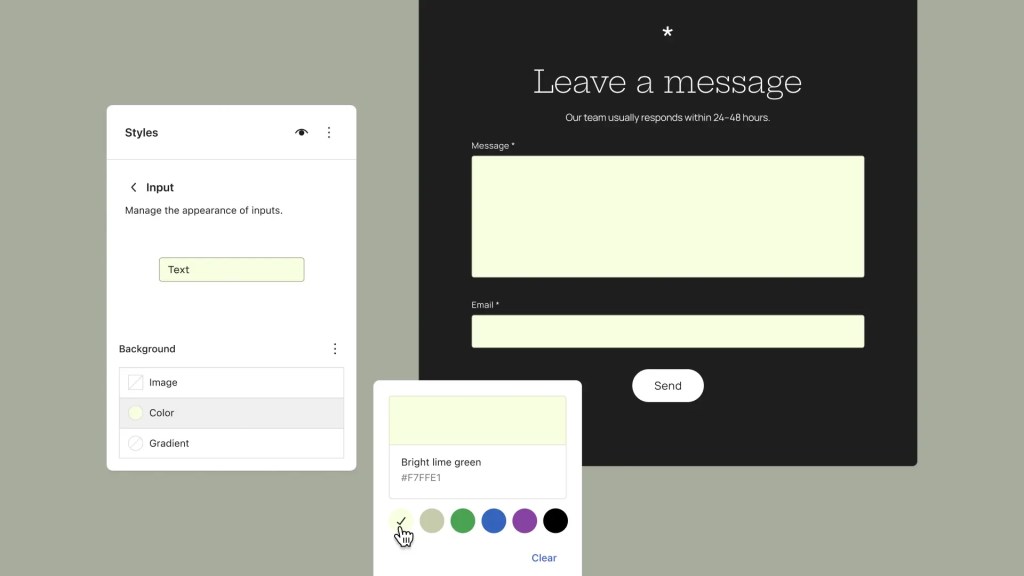
WordPress 7.2 makes site-wide styling easier to manage with a new Customized filter for finding blocks with modified styles and inherited Global Styles values displayed directly in block inspector controls. Expanded design tools and support for styling form elements provide additional flexibility when creating a consistent visual identity across a site.
Learn more: GitHub #82520, #76525, #34198, #84657
WordPress 7.2 introduces new text shadow controls, giving creators more ways to add depth and emphasis to their content. Text shadows can be customized through block settings and defined as presets in theme.json, making it easier to maintain consistent typography across a site.
Learn more: GitHub #73320, GitHub #79584, Trac #65869
Improvements to the Site Editor make managing navigation links more intuitive. Creators can add, organize, and edit navigation items directly from the editor sidebar, making it easier to maintain site menus without interrupting their editing workflow.
Learn more: GitHub #77069

WordPress 7.2 introduces Emoji reactions on notes and a new toolbar icon that makes Notes easier to access and manage. Notes move to the editor canvas, bringing conversations directly into the margin. Users can now keep Notes and the block settings sidebar open simultaneously, making it easier to review feedback while editing content.
A new minimized Notes mode reduces visual clutter, while improvements to positioning and display create a smoother, more consistent collaboration experience.
Learn more: GitHub #79970, GitHub #83786, GitHub #80015, Trac #64638
WordPress 7.2 expands client-side media processing to the Media Library, allowing images to be resized, compressed, and converted directly in the browser before being uploaded. This can improve upload performance, reduce server resource usage, and provide better support for modern image formats, particularly on hosting environments with limited image-processing capabilities.
Learn more: Trac #65661, GitHub #12585
WordPress 7.2 introduces a new On This Day dashboard widget that helps users rediscover content published on the same date in previous years. By highlighting posts from the site’s history, the widget makes it easier to revisit past content, celebrate milestones, and find opportunities to refresh or reshare older posts.
Learn more: Trac #65116
WordPress 7.2 includes a collection of smaller improvements aimed at reducing friction in everyday editing. These changes include clearer error messages, more helpful feedback when something goes wrong, and refinements to common editor interactions, making the editing experience more predictable and approachable.

Learn more: GitHub #81453, #82496, #84656, #84649
WordPress 7.2 continues modernizing the administration experience by replacing legacy Dashicons in the admin bar and sidebar with icons from the WordPress icon library. The updated icons bring greater visual consistency between the traditional WordPress dashboard and newer editing interfaces.
Learn more: GitHub #12270

A new DataForm-powered inspector introduces a refreshed approach to managing block settings in the editor. Built on the DataForm component system, this work aims to provide more consistent controls and a more extensible foundation for future block editing improvements.
Learn more: GitHub Gutenberg · Call for Testing
WordPress 7.2 improves admin performance by modernizing how scripts and stylesheets are loaded. Instead of combining assets into large files, WordPress now loads them individually for better browser caching. A new prefetching mechanism also anticipates which admin screen users are likely to visit next, loading its resources in advance to make navigation between the dashboard, post lists, and editor faster.
Learn more: Trac #57548
WordPress 7.2 introduces a Secrets API, providing developers with a standardized, secure way to store sensitive credentials such as API keys and authentication tokens. The API supports encryption at rest, credential rotation, and customizable storage providers, helping plugins and integrations manage sensitive information more securely.
WordPress 7.2 adds support for random content redirects, allowing visitors to discover a randomly selected post through a dedicated URL. This provides a simple way to encourage content exploration and help readers rediscover older posts.
Learn more: Trac #64498
WordPress 7.2 expands the Abilities API with new capabilities for accessing and querying WordPress data, providing a more consistent foundation for integrations, automation, and AI-powered tools. (Trac #66268, #64605, #64657)
Enhancements to the Interactivity API introduce new ways to render trusted HTML and manage reactive navigation, giving developers more flexibility when building dynamic, interactive blocks. (Trac #66246, Gutenberg PR #83092)
Additional improvements to the HTML API, block supports, and responsive design tools provide more reliable markup processing and greater control over how custom blocks are styled and displayed across devices. (Trac #65824, #66150, #65869)
Testing for issues is a critical part of developing any software, and it’s a meaningful way for anyone to contribute – whether or not you have experience. Details on what to test in WordPress 7.2 are available here.
If you encounter an issue, please share it in the Alpha/Beta area of the support forums. If you are comfortable submitting a reproducible bug report, you can do so via WordPress Trac. You can also check your issue against this list of known bugs.
Curious about testing releases in general and how to get started? Follow along with the testing initiatives in Make Core and join the #core-test channel on Making WordPress Slack.
WordPress 7.2 will include new features that were previously only available in the Gutenberg plugin. Learn more about Gutenberg updates since WordPress 7.1 in the What’s New in Gutenberg posts for versions 23.7, 23.8, 23.9, 24.0, 24.1, 24.2, and 24.3.
With so much in progress for WordPress 7.2 Beta 1, this is still only the beginning; expect continued refinement with each Beta and RC release ahead of the final release on December 8, 2026
Ipsum takes the stage
Secrets bloom, designs take shape
New blocks come alive
Props to @audrasjb, @annezazu, @adamsilverstein, @westonruter, @markoserb, @im3dabasia1, @jorbin, and @noruzzaman for proofreading and review.
A commentary on building meaningful online communities that prioritize value and listening over constant activity.
OpenStation is a free WordPress plugin that turns wp-admin into a desktop. Every admin screen opens in its own window that you can move, resize and keep open next to the others. You can try it in your browser right now, with nothing to install.
Can’t see the video? Watch it on YouTube.
Most of us spend the day jumping between screens in wp-admin. You open a post, go back to the list, check the media library, then go back again. With OpenStation, those screens stay open side by side, so you don’t lose your place.
Go to the OpenStation page on WordPress.org and click Live Preview. It runs a full WordPress site with OpenStation in your browser tab, so you can’t break anything.
OpenStation is opt-in for each user, so the rest of your team keeps the normal admin. Click the same icon to go back to the classic view. If you deactivate the plugin, wp-admin goes back to exactly how it was. It doesn’t change WordPress core.
Have a question? Ask in the support forum. Found a bug or have an idea? Open an issue on GitHub.